
Takeaway
startapp in Django checks your name against every importable Python module in the current environment, not just your project folder, so a name like ai_engine can fail even in a brand new project if something on the path already claims it. Rename the app, or skip the scaffold and build the file yourself inside a folder with that name. Either way, run python manage.py check afterward to confirm nothing is actually broken.
The Error That Made No Sense At First
I was setting up the backend for a project called ai-inventory, venv activated, nothing unusual running. Had just finished editing config/settings.py and wanted to scaffold the AI side of the project before I lost the thread of what I was doing.
python manage.py startapp ai_engineAnd Django just refused.
CommandError: 'ai_engine' conflicts with the name of an existing Python module and cannot be used as an app name. Please try another name.This was a new project. I hadn’t created anything called ai_engine yet, this command was supposed to be the thing that created it. So what exactly was it conflicting with.
Why Startapp Rejects Names That Aren’t Even In Your Project
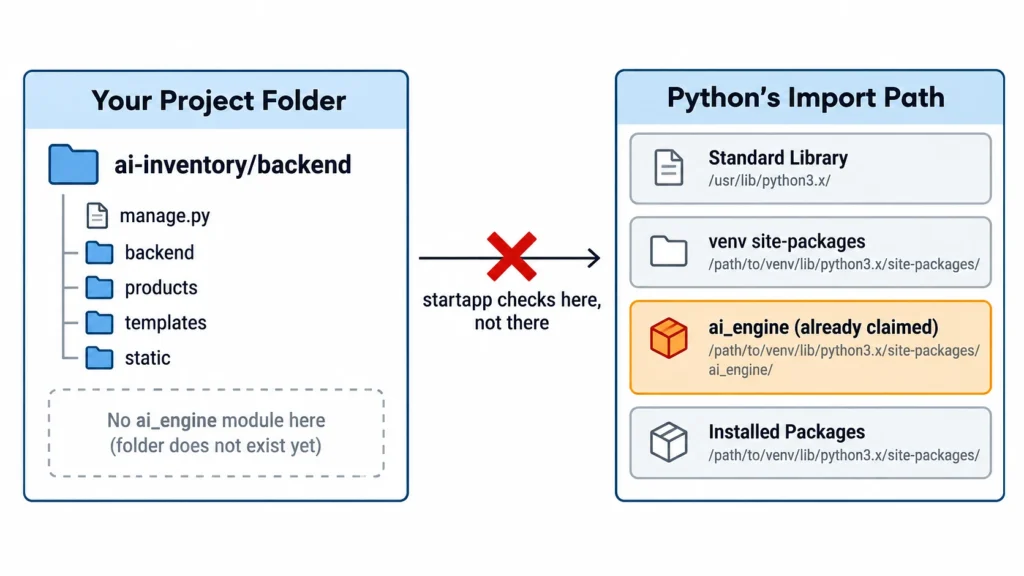
startapp doesn’t look inside your project directory to check for a name collision. It checks against every module Python can currently import in that environment, the standard library, anything pip installed into the venv, and any package that happens to expose a top level module using that name.
The reason is that startapp works by generating an actual importable Python package. If something called ai_engine already exists anywhere on the interpreter’s path, you’d end up with two things trying to answer to the same import name, and Django refuses to create that ambiguity in the first place.
ai_engine is common enough as a name that something in the environment, a stray cached module or a dependency exposing that name, had already claimed it before I got there.
The Fix I Actually Used
There are two ways to get past this.
Option 1 – rename the app. Something like ai_engine_app or inventory_ai clears the collision instantly and you can keep using startapp the normal way.
Option 2 – skip the scaffold and build the file by hand. I only needed one file to get moving, not the full boilerplate startapp generates, so I made the folder myself and created the file directly inside it.
notepad ai_engine\services.pyThis sidesteps the exact collision check that startapp runs automatically, since I’m not asking Django to generate a new importable package, I’m just writing a file inside a directory I control.
Then the part that actually confirms things are fine:
python manage.py checkSystem check identified no issues (0 silenced).Clean. Project back to a working state.
Why This Happens More Than You’d Expect
Naming a module exactly what it does, ai_engine, auth, core, utils, feels like the obvious choice, and that’s exactly why it’s risky. The more obvious a name is, the more likely it’s already taken somewhere in the enormous number of packages floating around any given Python environment.
If you hit this exact error, check which option fits your situation. Rename the app if you don’t need to keep that specific name. Build the file manually if you only needed a piece or two and don’t care about the generated boilerplate. Either way, run manage.py check afterward, it’s the fastest way to confirm your imports are actually healthy before building anything else on top.