

Unexpected hyphens can make a beautifully designed website look like an old, chopped-up newspaper. While automatic hyphenation is great for saving space in tight editorial columns, it often wreaks havoc on modern responsive layouts, leaving random dashes scattered across your paragraphs.
If your text is breaking in all the wrong places and you want a clean, smooth justified or left-aligned look, you are in the right place.
Here is your complete, step-by-step guide to completely removing hyphenation using CSS.
Why is My Text Hyphenating Anyway?
Modern browsers have gotten pretty smart. When a container shrinks (like on a mobile screen), browsers will automatically insert hyphens into long words to prevent the text from overflowing its box. This is usually triggered by a CSS property called hyphens: auto; or inherited from default browser stylesheets, especially when the HTML lang attribute is set.
The 3-Step Fix: How to Remove Hyphenation
Removing hyphenation requires targeting the right elements and applying the CSS
hyphensproperty. Here is exactly how to do it.
Step 1: Identify the Affected Elements
First, look at your website and figure out where the ugly hyphens are showing up. Is it across the entire site? Just in your blog posts? Or maybe inside a tiny sidebar widget?
- If you want to disable it everywhere, you will target the
bodyor universal selector*. - If you want to disable it for specific paragraphs, you will target a class like
.no-hyphensor your paragraph tagsp.
Step 2: Apply the hyphens: none Property
The magic bullet here is hyphens: none;. This forces the browser to wrap words to the next line as a whole, rather than breaking them apart with a dash.
To ensure it works across all devices and older browsers, you should also include the appropriate vendor prefixes (-webkit- and -ms-ms-).
Here is the exact code snippet you need to add to your stylesheet:
CSS
/* Disable hyphenation for specific elements */
p, .no-hyphens {
    -webkit-hyphens: none;  /* Safari and older Chrome */
    -ms-hyphens: none;      /* Internet Explorer/Edge */
    hyphens: none;          /* Standard syntax (Firefox, Chrome, Opera) */
}
Step 3: Clear the HTML Soft Hyphens (If Applicable)
Sometimes, CSS isn’t the problem. If someone manually inserted “soft hyphens” into the HTML content using the ­ code, the browser will still break the word at that specific point.
Quick Tip: If you applied the CSS fix and you still see a hyphen, search your HTML source code or CMS editor for
­and delete it.
Complete Code Example
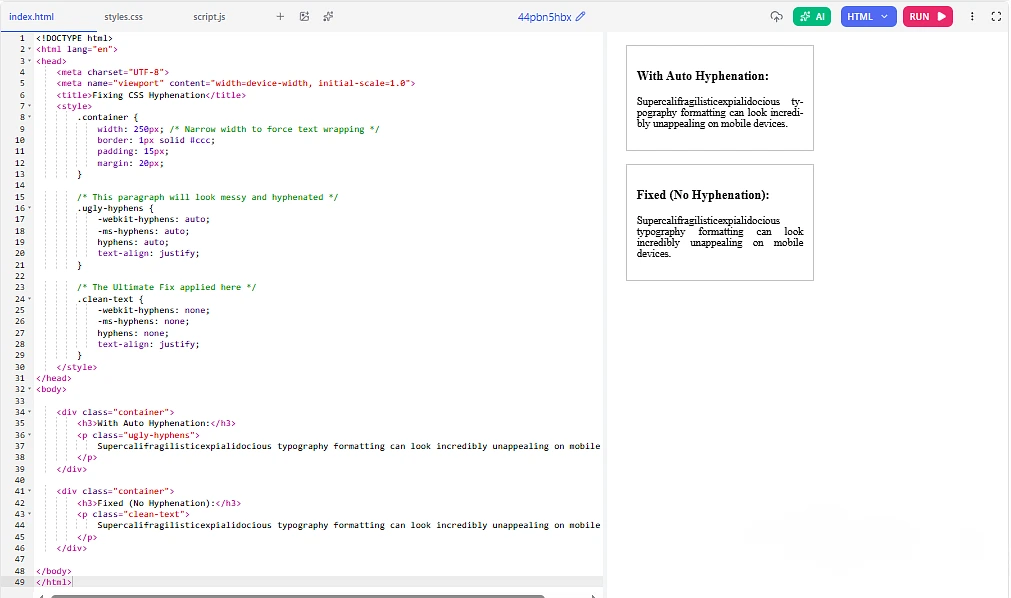
Here is a complete, real-world HTML and CSS example so you can see exactly how it works in practice.
HTML
<!DOCTYPE html>
<html lang="en">
<head>
    <meta charset="UTF-8">
    <meta name="viewport" content="width=device-width, initial-scale=1.0">
    <title>Fixing CSS Hyphenation</title>
    <style>
        .container {
            width: 250px; /* Narrow width to force text wrapping */
            border: 1px solid #ccc;
            padding: 15px;
            margin: 20px;
        }

        /* This paragraph will look messy and hyphenated */
        .ugly-hyphens {
            -webkit-hyphens: auto;
            -ms-hyphens: auto;
            hyphens: auto;
            text-align: justify;
        }

        /* The Ultimate Fix applied here */
        .clean-text {
            -webkit-hyphens: none;
            -ms-hyphens: none;
            hyphens: none;
            text-align: justify;
        }
    </style>
</head>
<body>

    <div class="container">
        <h3>With Auto Hyphenation:</h3>
        <p class="ugly-hyphens">
            Supercalifragilisticexpialidocious typography formatting can look incredibly unappealing on mobile devices.
        </p>
    </div>

    <div class="container">
        <h3>Fixed (No Hyphenation):</h3>
        <p class="clean-text">
            Supercalifragilisticexpialidocious typography formatting can look incredibly unappealing on mobile devices.
        </p>
    </div>

</body>
</html>
Troubleshooting: What if the Text is Still Breaking?
If you applied hyphens: none; and your text is still acting crazy, you might be dealing with a different CSS layout property. Check your stylesheet for these two culprits:
| Property & Value | What it Does | How to Fix It |
|---|---|---|
word-break: break-all; | Forces words to break at any exact character to prevent overflow, without adding a hyphen. | Change to word-break: normal; |
overflow-wrap: break-word; | Breaks long words onto a new line only if they cannot fit their container. | Change to overflow-wrap: normal; |
If you want absolute layout safety without ugly dashes, combining hyphens: none; with overflow-wrap: break-word; is generally considered the best practice for modern web design. It keeps your regular text looking clean while preventing freakishly long words or URLs from breaking your site’s layout.