

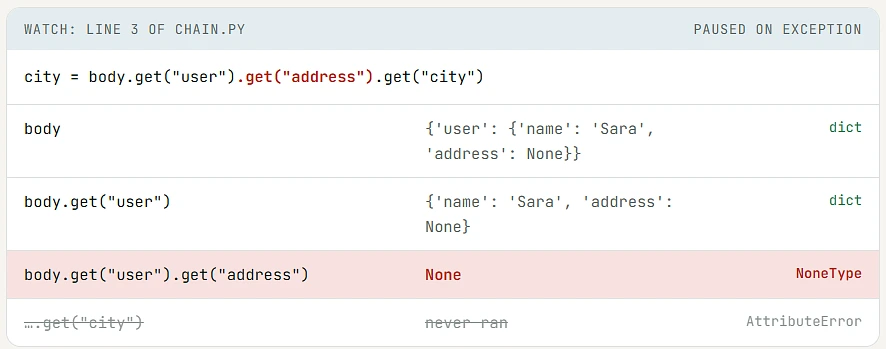
Pause a debugger on the crash and type each piece of the line into the watch window, and the answer stops being a mystery. The traceback names .get, so most people go looking at the key they asked for. That key was never reached. Python crashed one step earlier, at the object the method was called on.
The error means the thing written just before
.get(holdsNonerather than a dictionary.Nonehas nogetmethod, so Python stops. To fix it, find which expression producedNone, then either make it return a real dict or check forNonebefore you call.get()on it.
Below are the five sources that produce this error most often, each one reproduced in Python 3.13, then fixed code you can copy for each, a way to let a type checker warn you before the script runs, and the reason a blanket try/except tends to make things worse.
Python Is Complaining About The Object, And The Key Comes Later
A dictionary owns a method called get. As the Python documentation for dict.get() puts it, get(key, default=None) hands back the value for a key, or the default when the key is missing. None is a different object altogether, of type NoneType, and the only attributes it carries are the plain ones every Python object has. Ask it for .get and Python raises AttributeError before any key is looked at.
Read the message from the end and it says so directly:
- ‘get’ is the attribute your code asked for.
- ‘NoneType’ object is what it asked on, meaning the value to the left of the dot.
- has no attribute means that object type has no such method at all, whatever the key.
So the key name inside the brackets is innocent. Spelling it differently will change nothing, because the dictionary you expected to search was never there.
Python 3.11 And Newer Underline The Part That Came Back Empty
On a long chained line, older Python versions gave you the line number and left the guessing to you. Since 3.11 the traceback draws carets under the exact expression that failed. Run the line from the watch panel and look at where the carets stop:
import json
body = json.loads('{"user": {"name": "Sara", "address": null}}')
city = body.get("user").get("address").get("city")
Output on Python 3.13.18
Traceback (most recent call last):
  File "chain.py", line 3, in <module>
    city = body.get("user").get("address").get("city")
           ^^^^^^^^^^^^^^^^^^^^^^^^^^^^^^^^^^^
AttributeError: 'NoneType' object has no attribute 'get'
The carets cover body.get("user").get("address") and stop before the last .get("city"). Whatever sits under the carets is the value that turned out to be None. On Python 3.10 or older you will not get the carets, so split the chain onto separate lines and the line number will tell you the same thing.
These Five Mistakes Produce Almost Every Case Of This Error
All five were run in one script so you can see each failure beside the others. The output is identical for all of them, which is exactly why the message alone cannot tell you which one you have.
import json
import traceback
from bs4 import BeautifulSoup


def run(label, fn):
    print(f"--- {label}")
    try:
        print("result:", fn())
    except AttributeError as e:
        print(f"AttributeError: {e}")


# 1. A function that builds a dict but never returns it
def load_settings():
    settings = {"theme": "dark", "lang": "en"}


run("1 missing return", lambda: load_settings().get("theme"))

# 2. An API body where the key exists but holds null
body = json.loads('{"user": {"name": "Sara", "address": null}}')
run("2 chained get on null", lambda: body.get("user").get("address").get("city"))

# 3. The {} default does not help when the key is present with null
run("3 get(key, {}) on null", lambda: body["user"].get("address", {}).get("city"))

# 4. BeautifulSoup find() matched nothing
html = '<form id="login"><input name="email"></form>'
soup = BeautifulSoup(html, "html.parser")
run("4 bs4 find() returned None", lambda: soup.find("form", id="signup").get("action"))

# 5. requests: response.json() on a body of "null"
run("5 json body is null", lambda: json.loads("null").get("data"))
Output: five different causes, one message
--- 1 missing return
AttributeError: 'NoneType' object has no attribute 'get'
--- 2 chained get on null
AttributeError: 'NoneType' object has no attribute 'get'
--- 3 get(key, {}) on null
AttributeError: 'NoneType' object has no attribute 'get'
--- 4 bs4 find() returned None
AttributeError: 'NoneType' object has no attribute 'get'
--- 5 json body is null
AttributeError: 'NoneType' object has no attribute 'get'
A Function Built The Dictionary And Forgot To Return It
Case 1 is the most common cause in beginner code. load_settings() fills a local variable called settings and then ends. A Python function without a return statement hands back None, so load_settings().get("theme") becomes None.get("theme"). Look for this whenever the value comes straight out of your own function. A return sitting inside an if that did not run has the same effect.
The JSON Had The Key, Though Its Value Was null
Case 2 comes from APIs. A field that is empty in the source system often arrives as "address": null, and json.loads() turns JSON null into Python None. The first two .get() calls work, the third lands on None. Payment, address and profile fields are frequent offenders because they are optional for some users and filled for others, so the code passes your tests and then breaks on one real record.
Your {} Default Only Helps When The Key Is Missing Entirely
Case 3 catches people who already know about defaults. Writing .get("address", {}) looks safe, yet it still crashes. The default is returned only when the key is absent. Here the key is present and its value is None, so get returns that None faithfully. The freeCodeCamp write-up on dict.get() walks through this exact trap with a product price field. Swap the default for or {}, as shown in the fixes below, and both the missing key and the null value end up as an empty dict.
BeautifulSoup’s find() Matched Nothing On The Page
Case 4 is the scraper version. According to the Beautiful Soup documentation, find() returns None when no tag matches, while find_all() returns an empty list. Calling .get("action") or .get("href") straight on the result works for months, until the site renames a class, serves a login wall, or shows a cookie page to your server’s IP. Users of the aws-google-auth tool reported this exact crash on a line reading form.get('action'), where the sign-in page they received held no matching form.
The Whole Response Body Was null
Case 5 is rarer but confusing when it happens. Some APIs answer a lookup for a missing record with the literal body null and a 200 status. response.json() parses that without complaint and gives you None. If the body is not valid JSON at all, you get a JSONDecodeError instead, a different problem covered in our JSONDecodeError “Extra data”.
A Tkinter Widget Was Created And Placed On One Line
One more source shows up often on forums from people building desktop forms. e_name = Entry(root).grid(row=0, column=1) stores the result of .grid(), and grid(), pack() and place() all return None. Later, e_name.get() fails with this exact message. Create the widget on one line, place it on the next:
from tkinter import Tk, Entry

root = Tk()
e_name = Entry(root)          # keep the widget
e_name.grid(row=0, column=1)  # place it separately
print(e_name.get())
Print The Suspect Value Before You Change Any Code
Guessing at fixes wastes time when one line of output can settle it. Put this directly above the line that crashes, using the expression the carets pointed at:
suspect = body.get("user").get("address")
print(type(suspect), repr(suspect))
<class 'NoneType'> None
If the type is NoneType, walk one step back and print the thing that produced it. For a function, check its return paths. For an API, print response.status_code and response.text to see the raw body. For a scraper, save response.text to a file and open it, because the page your script received is often a different page from the one your browser shows. You can also drop breakpoint() on that line and type the expressions into the debugger yourself, which is how the watch panel at the top was built.
Here Is The Fixed Code For Each Case
The file below holds a fix for each cause. The dig() helper is the one worth keeping in a utilities module, since it walks nested JSON and stops at the first missing or null level, returning your default instead of crashing.
"""Fixes for AttributeError: 'NoneType' object has no attribute 'get'."""
from __future__ import annotations

import json
from typing import Any

from bs4 import BeautifulSoup


# Fix 1: return the dict you built
def load_settings() -> dict[str, str]:
    settings = {"theme": "dark", "lang": "en"}
    return settings


# Fix 2: walk nested JSON with "or {}" so a null value becomes an empty dict
def dig(data: Any, *keys: str, default: Any = None) -> Any:
    """Follow keys through nested dicts; stop at the first missing or null level."""
    current = data
    for key in keys:
        if not isinstance(current, dict):
            return default
        current = current.get(key)
        if current is None:
            return default
    return current


# Fix 3: check what find() gave back before calling .get() on it
def form_action(html: str, form_id: str) -> str | None:
    soup = BeautifulSoup(html, "html.parser")
    form = soup.find("form", id=form_id)
    if form is None:
        print(f"no <form id={form_id!r}> on this page")
        return None
    action = form.get("action")
    return action if isinstance(action, str) else None


if __name__ == "__main__":
    print("1:", load_settings().get("theme"))

    body = json.loads('{"user": {"name": "Sara", "address": null}}')
    print("2a:", (body.get("user") or {}).get("name"))
    print("2b:", (body["user"].get("address") or {}).get("city", "unknown"))
    print("2c:", dig(body, "user", "address", "city", default="unknown"))
    print("2d:", dig(body, "user", "name"))
    print("2e:", dig(json.loads("null"), "data", default="empty body"))

    html = '<form id="login" action="/session"><input name="email"></form>'
    print("3a:", form_action(html, "login"))
    print("3b:", form_action(html, "signup"))
Output on Python 3.13.18 with beautifulsoup4 4.15.0
1: dark
2a: Sara
2b: unknown
2c: unknown
2d: Sara
2e: empty body
3a: /session
no <form id='signup'> on this page
3b: None
Which fix fits depends on what None means in your data:
| Situation: | Use this: | Why: |
|---|---|---|
| Your own function returned nothing | Add the missing return | A guard here would only hide a real bug. |
| One optional field, possibly null | (data.get("k") or {}).get("x") | Covers both a missing key and a null value in one expression. |
| Deeply nested API JSON | dig(data, "a", "b", "c", default=...) | Reads cleanly and stops at the first gap. |
| Scraper element that may vanish | if tag is None: with a log line | You learn the page changed instead of silently storing blanks. |
Use is None for the check, never == None and not a bare truthiness test when an empty dict is a valid answer. if not value treats {}, 0 and "" as missing too, and that can turn a real empty result into an error branch.
Let mypy Catch The None Before Python Does
If a function can return None, say so in its type hint, and a type checker will flag every caller that forgets to check. The mypy guide to optional types explains that Optional[dict] (or dict | None on Python 3.10+) marks a value that might be None, and that mypy refuses method calls on it until you have narrowed it with a check.
from typing import Optional


def find_user(user_id: int) -> Optional[dict]:
    users = {1: {"name": "Sara"}}
    return users.get(user_id)


name = find_user(7).get("name")
Output from mypy 2.3.1
$ mypy typed.py
typed.py:9: error: Item "None" of "dict[Any, Any] | None" has no attribute "get"  [union-attr]
Found 1 error in 1 file (checked 1 source file)
That is the same mistake as the runtime crash, found without running anything. fixed.py from the section above passes mypy with no issues, because each None is checked before use. Install it with pip install mypy and run mypy yourfile.py, or turn on type checking in VS Code or PyCharm to see the warning while you type.
Should You Just Wrap It In try/except AttributeError?
Usually not. A broad except AttributeError: pass silences this error and every other attribute typo in the same block, including bugs you would want to hear about. Your script keeps running and writes empty rows, and the first sign of trouble is a report weeks later. Check for None at the exact spot where it can legitimately appear, and let everything else fail loudly.
The one place a try makes sense is around a whole record in a batch job, where one malformed item should be logged and skipped while the rest carry on. Even then, log the record’s ID and the exception so you can come back to it.
How This Was Tested
- Python 3.13.18 on Linux ran
repro.py,chain.pyandfixed.py. Output above is copied from those runs. - beautifulsoup4 4.15.0 with the built-in
html.parserfor the scraper cases. - mypy 2.3.1 flagged
typed.pyand passedfixed.py. - The Tkinter snippet was not run here, as this sandbox has no Tk installed. The behaviour it shows,
grid()returningNone, is standard across Tkinter versions. - The live API cases were simulated with
json.loads()on the same bodies an API would send, sinceresponse.json()parses them the same way.
Once you know which expression handed you None, the fix is usually one line. The time goes into finding that expression, and the carets, a single print(type(x)), or a type hint will get you there faster than rereading the key name.