

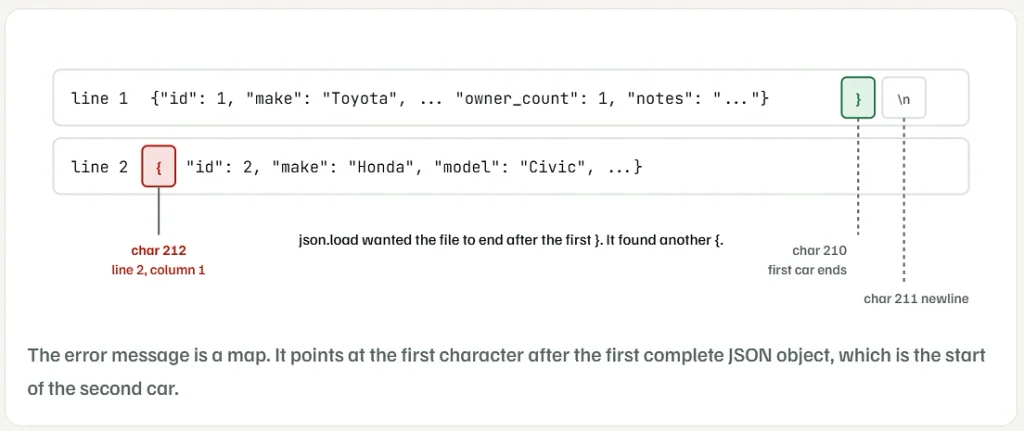
Nothing is wrong with your code, and nothing is wrong with line 2 of the file. The file is not one JSON document but many, one car on each line, a layout called JSON Lines.json.load()reads exactly one document. It finished the first car at the end of line 1, saw the second car begin, and raised "Extra data" because, as far as it knows, the file should have ended there. Read the file one line at a time withjson.loads(), and every car comes through. That is also the shape Elasticsearch prefers, so the loading code below goes straight from the file into the index.
Line 2 Looked Fine Because It Is Fine
Python · the code from the question
import json
from elasticsearch import Elasticsearch

es = Elasticsearch([{'host': 'localhost', 'port': 9200, 'scheme': 'http'}])
index_name = 'car_data'

with open("file_path", 'r') as file:
    data = json.load(file)
Reproduced with a three-car file whose first line is 211 characters long
json.decoder.JSONDecodeError: Extra data: line 2 column 1 (char 212)
The question says line 2 column 1 showed nothing wrong, and that is correct. The message does not mean “line 2 is broken”. It means “I had already finished, and at line 2 column 1 there was more”. The numbers are worth reading carefully:
- char 212 counts characters from 0, starting at the first character of the file.
- In the test file, line 1 is 211 characters long, at positions 0 to 210. Position 211 is the newline. Position 212 is the first
{of the second car. - So the number in your error is the length of your first line plus one. If you count your own first line, you will find 211 characters.
Look at the File Before You Change Any Code
A JSON file can come in two layouts, and the fix depends on which one you have. This short script prints the first three lines without loading anything.
Python · peek.py
"""peek.py - show what a .json file really looks like before you load it.
Usage: python peek.py "C:/path/to/car_data.json"
"""
import sys

path = sys.argv[1]
with open(path, "r", encoding="utf-8") as f:
    text = f.read()

lines = text.splitlines()
print(f"{len(text)} characters, {len(lines)} lines")
print("first character :", repr(text.lstrip()[:1]))
for n, line in enumerate(lines[:3], start=1):
    print(f"line {n} ({len(line)} chars): {line[:90]}{'...' if len(line) > 90 else ''}")
Terminal
python peek.py car_data.json
What you should see
570 characters, 3 lines
first character : '{'
line 1 (211 chars): {"id": 1, "make": "Toyota", "model": "Corolla", "year": 2019, "price": 15900, "fuel": "pet...
line 2 (174 chars): {"id": 2, "make": "Honda", "model": "Civic", "year": 2021, "price": 21450, "fuel": "petrol...
line 3 (182 chars): {"id": 3, "make": "Tesla", "model": "Model 3", "year": 2022, "price": 33900, "fuel": "elec...
- Every line starts with
{and the file does not start with[: it is JSON Lines. Your case. Read on. - The file starts with
[: it is a normal JSON array, andjson.load()would have worked. The error then means something was added after the closing], often a second array pasted below the first. - Every other line looks like
{"index": ...}: it is an Elasticsearch bulk file. The loader below handles that too.
Read the File Line By Line With json.loads
The fix fits in five lines. Open the file, go through it line by line, and turn each line into a Python dictionary on its own.
Python · the smallest change that makes the error go away
import json

cars = []
with open("file_path", "r", encoding="utf-8") as file:
    for line in file:
        line = line.strip()
        if line:                         # the last line is often empty
            cars.append(json.loads(line))   # loads, with an s: one line, one car

print(len(cars), "cars loaded")
print(cars[0]["make"], cars[0]["model"])
What you should see
3 cars loaded
Toyota Corolla
Two letters carry the change. json.load(file) reads a whole file as one document. json.loads(text), where the s stands for string, reads one piece of text. One line holds one car, so loads on each line is the right tool.
Many Course Files Are Already in the Elasticsearch Bulk Format
Course datasets meant for Elasticsearch are often shipped ready for its bulk API, where an instruction line sits before every document. Opened in a text editor, such a file looks like this:
JSON Lines · what a bulk-format file looks like
{"index": {"_index": "car_data", "_id": 1}}
{"id": 1, "make": "Toyota", "model": "Corolla", "year": 2019, ...}
{"index": {"_index": "car_data", "_id": 2}}
{"id": 2, "make": "Honda", "model": "Civic", "year": 2021, ...}
Loading this with the five-line fix would give you twice as many records as cars, half of them instructions. The loader below skips any line made only of index or create, so both file layouts give the same result.
Send the Cars to Elasticsearch in One Bulk Request
The original code built the client and named the index but stopped before sending anything. The helpers.bulk() function in the official client takes a stream of documents and sends them in batches, so it works the same for 3 cars and for 300,000.
Python · load_cars.py
"""load_cars.py - read car_data.json (one JSON object per line) and index it into Elasticsearch.
Usage: python load_cars.py "C:/path/to/car_data.json"
"""
import json
import sys

from elasticsearch import Elasticsearch, helpers

INDEX_NAME = "car_data"


def read_documents(path):
    """Yield one dict per car. Works for JSON Lines and for Elasticsearch bulk files."""
    with open(path, "r", encoding="utf-8") as file:
        for line_number, line in enumerate(file, start=1):
            line = line.strip()
            if not line:
                continue                      # skip blank lines, e.g. the last one
            try:
                record = json.loads(line)     # loads = one string, one object
            except json.JSONDecodeError as error:
                raise SystemExit(f"Line {line_number} is not valid JSON: {error}")
            if set(record) <= {"index", "create"}:
                continue                      # bulk-format action line, not a car
            yield record


def to_actions(documents):
    """Turn each car into the shape helpers.bulk() expects."""
    for doc in documents:
        action = {"_index": INDEX_NAME, "_source": doc}
        if "id" in doc:
            action["_id"] = doc["id"]         # running the script twice won't make duplicates
        yield action


def main(path):
    es = Elasticsearch("http://localhost:9200")
    if not es.ping():
        raise SystemExit("Elasticsearch is not answering on http://localhost:9200")

    ok, errors = helpers.bulk(es, to_actions(read_documents(path)), raise_on_error=False)
    print(f"Indexed {ok} documents into '{INDEX_NAME}', {len(errors)} errors")
    for err in errors[:5]:
        print("  ", err)

    es.indices.refresh(index=INDEX_NAME)
    print("Count in index:", es.count(index=INDEX_NAME)["count"])


if __name__ == "__main__":
    main(sys.argv[1])
read_documents()reads one line at a time, skips blank lines and bulk instructions, and names the line number if one is damaged.to_actions()wraps each car in the shapehelpers.bulk()expects. When a car has anid, it becomes the document id, so running the script twice updates the cars instead of doubling them.Elasticsearch("http://localhost:9200")is the short form of the dictionary in the question. Both work with the current client.es.ping()checks the server first, so a stopped Elasticsearch gives a plain message instead of a long connection error.
Terminal
pip install elasticsearch
python load_cars.py "C:/Users/you/Downloads/car_data.json"
What you should see
Indexed 3 documents into 'car_data', 0 errors
Count in index: 3
When One Line in the File Really Is Broken
Large files sometimes carry one bad record, and the loader tells you exactly which line it is.
Terminal · a file with one damaged line
python load_cars.py broken.json
What you should see
Line 2 is not valid JSON: Expecting ',' delimiter: line 1 column 23 (char 22)
Here, line 2 is missing its closing brace. Open the file at that line, fix it or delete it, and run the script again.
Check That the Index Holds the Cars
Terminal · ask Elasticsearch what it holds now
curl "http://localhost:9200/car_data/_count?pretty"
curl "http://localhost:9200/car_data/_search?q=make:Toyota&pretty"
Pandas Reads the Same File in One Line
If the assignment also asks for a table of the data, pandas has this layout built in. lines=True tells it to expect one JSON object per line.
Python · if the assignment uses pandas
import pandas as pd

df = pd.read_json("file_path", lines=True)
print(df.head())
How This Was Tested
A three-car JSON Lines file was built with a first line of exactly 211 characters, and the code from the question raised the same message, char 212 included. peek.py, the five-line fix and the pandas line were run on Python 3.13. The Elasticsearch client could not be installed in the test machine, so load_cars.py was run against a small stand-in for the client: the reading, skipping and id handling ran for real on both file layouts and on the broken file, while the request to a live Elasticsearch server was not made. Run it once against your own server before handing in the assignment.