

Press S in the Limine menu, get this:
Rebooting to the firmware setup...
PANIC: Failed to reboot to firmware UI
Stacktrace:
  [0x6678ebcf] <panic+0x15f>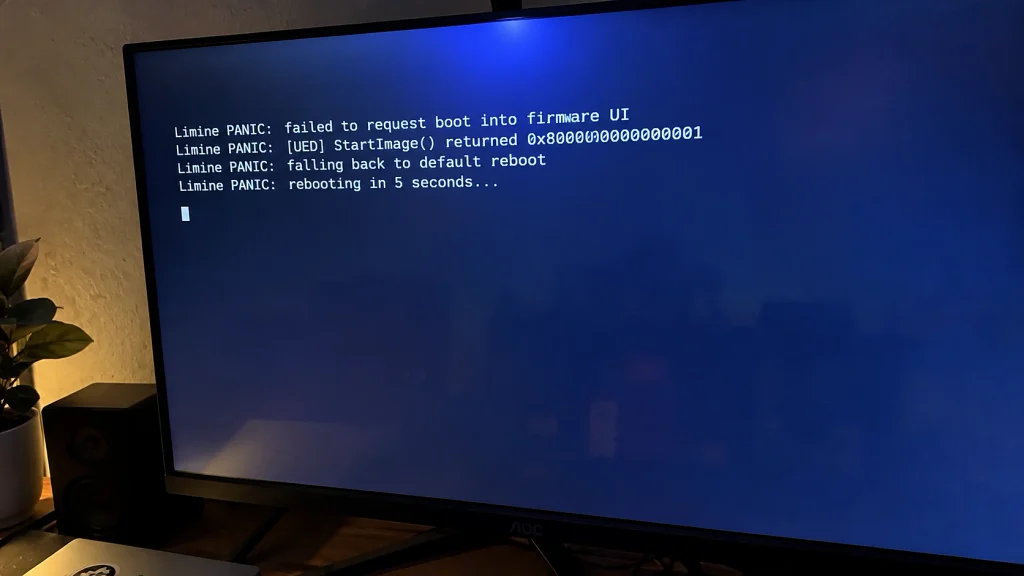
Then the machine restarts and lands in your UEFI settings anyway.
Almost everybody who sees this has just been in the firmware doing something. An admin password, Secure Boot, a boot order edit. All three of those move nvram around, and that is where this lives.
Pressing S Only Sets A Flag And Asks For A Restart
There is nothing clever behind that key. It runs the normal UEFI handshake for “open setup on the next boot”:
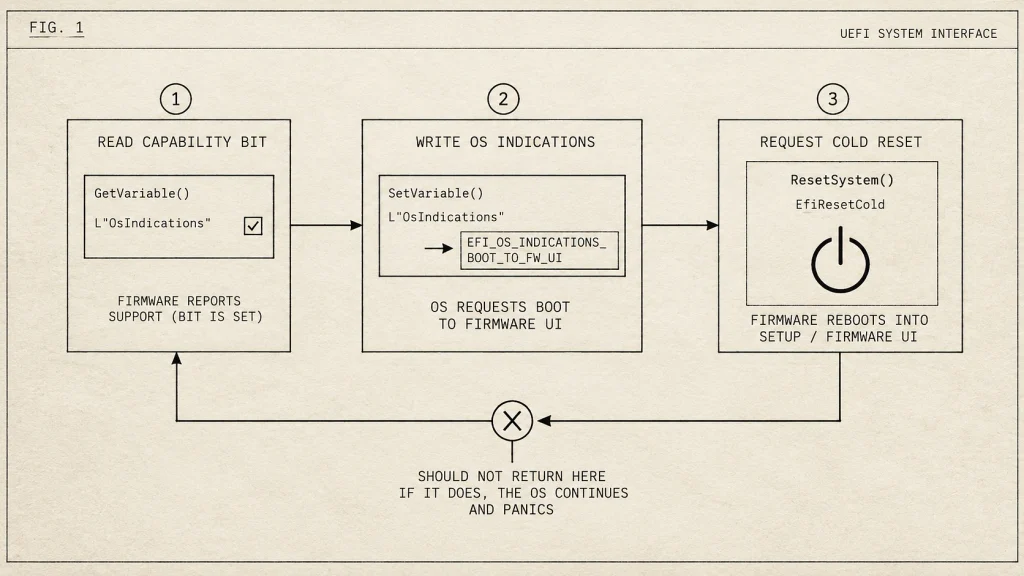
- Read
OsIndicationsSupported, check bit 0. That bit is the firmware saying it will accept the request. - Write
OsIndicationswith the same bit set, using runtimeSetVariable. - Call
ResetSystem, cold.
On a working board step three never returns. The box just goes.
Limine panics when ResetSystem comes back to it instead of resetting, and it prints the same panic if step one or step two failed, so the message alone won’t tell you which of the three broke.
Reaching The UEFI Screen
Your firmware took the OsIndications write and kept it. The reset came late, or came from somewhere else after Limine had already given up and printed. Next power cycle, the firmware read the variable, saw the request, opened setup.
So the variable side works and the reset side doesn’t. Better position than the word PANIC suggests.
Systemctl Reboot Tells You Which Half To Look At
Boot into Linux first:
systemctl reboot --firmware-setupsystemd runs the same three steps from userspace through efivarfs instead of EFI runtime calls.
- Straight into setup, no error: nvram is fine, the bit is there, and what’s left is Limine’s reset call against firmware that mishandles it.
- Errors out or does nothing: your variable store is the problem.
While you’re in Linux, look at whether the capability bit is even advertised anymore. A rebuilt variable store doesn’t always come back the same:
hexdump -C /sys/firmware/efi/efivars/OsIndicationsSupported-8be4df61-93ca-11d2-aa0d-00e098032b8cFirst four bytes are attributes, the eight after that are the value in little endian. Fifth byte odd means bit 0 is set. No file at all means the firmware isn’t offering the feature right now and the key can’t work until it does.
The Admin Password Is Why Your Boot Entries Moved
Setting or clearing a UEFI admin password is not a small change on most consumer boards. It flips between setup mode and user mode, it can re-provision Secure Boot state, and plenty of vendor firmware rewrites part of the variable store while it’s at it. Entries get reordered. Some get dropped. Windows spots its own entry missing on the next boot and writes a new one, which is usually why fixing the Windows bootloader breaks the Linux one right after.
Dead Entries First
sudo efibootmgr -v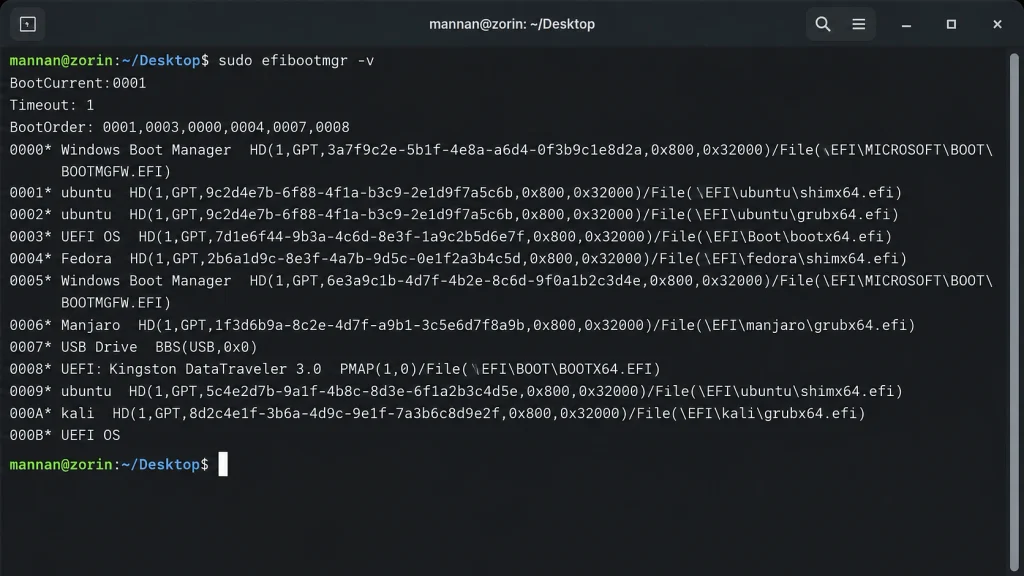
Duplicates, entries pointing at partitions that aren’t there anymore, BootOrder listing numbers that match nothing. Delete them one at a time:
sudo efibootmgr -b 0005 -BA variable store near full makes SetVariable fail with out of resources, and everything calling it just reports a generic failure. Most boards give you a few dozen KB to work with and Windows fills it fast.
A stuck OsIndications
If an old run left the variable written with attributes the firmware now won’t overwrite, the next write fails.
ls -l /sys/firmware/efi/efivars/ | grep -i osindicationsefivarfs marks these immutable, so it’s two steps:
sudo chattr -i /sys/firmware/efi/efivars/OsIndications-8be4df61-93ca-11d2-aa0d-00e098032b8c
sudo rm /sys/firmware/efi/efivars/OsIndications-8be4df61-93ca-11d2-aa0d-00e098032b8c
One variable, by name. No wildcards, no recursive delete anywhere inside efivars. There are boards that stop POSTing once their variable store gets wiped, and you can’t reinstall your way out of a board that won’t POST.
Back to Defaults
Into setup, load optimized defaults, save, boot once. If Secure Boot is anywhere near this, restore factory keys instead of leaving it in custom or setup mode. Admin password stays off.
If efibootmgr showed a mess you couldn’t clean, clearing CMOS is what’s left. It takes every boot entry with it, so have a live USB sitting there and plan on re-adding Limine and Windows Boot Manager after.
Reinstalling Limine Beats Patching It A Third Time
Two rounds of editing configs in a panic leaves state nobody can reconstruct later, including you. Update the package and let the tooling write the binary and the config:
sudo pacman -Syu limine
sudo limine-update
On CachyOS the entries come from /etc/default/limine and the mkinitcpio hook, so edit there and not the generated file. Then check what actually landed:
ls -l /boot/EFI/limine/ /boot/EFI/BOOT/
sudo efibootmgr -v | grep -i limine
One binary, one boot entry pointing at it, nothing left behind from the recovery attempts. If systemd-boot is still sitting on the ESP and you’re not using it, take it off. Two bootloaders sharing one ESP is its own set of problems.
Newer Limine builds have picked up fixes for firmware that mishandles the reset call, so being a version behind is worth ruling out.
Nothing In That Code Path Touches Your Disks
The whole thing sets a flag for the firmware to read next boot and asks for a restart. It doesn’t write to your ESP, your partition table, your kernel images or your Windows install. Both systems boot for you, so the loader and the entries are fine.
The variable store filling up is the only part here that turns into a real problem, and it does it quietly, months later, when something important can’t write. Run efibootmgr -v now and then, clear out what’s dead.