

Paste this into your browser console and guess the order of the output before you look.
const wait = (ms) => new Promise(r => setTimeout(r, ms));
const ids = [1, 2, 3];
const log = [];

ids.forEach(async (id) => {
  await wait(10);
  log.push('saved ' + id);
});
log.push('done');

setTimeout(() => console.log(log), 50);
Output
[ 'done', 'saved 1', 'saved 2', 'saved 3' ]
“done” comes first, even though it is the last line of the code. forEach does not wait for await. It starts all three saves and moves straight on. Swap in for...of and the order comes out right:
for (const id of ids) {
  await wait(10);
  log.push('saved ' + id);
}
log.push('done');
Output
[ 'saved 1', 'saved 2', 'saved 3', 'done' ]
Every loop below looks like it does the same job. They don’t. This guide shows each one with code and real output, a tested table of what each can and can’t do, and a speed test on one million items.
Which Loop to Use: The Short Answer
- Just go through every item →
for...of - Need the position number too →
for...ofwith.entries(), or a classicfor - Need to stop early →
for...ofwithbreak, orfind()/some() - Need
awaitinside, one at a time →for...of - Need
await, all at once →Promise.all(array.map(...)) - Want a new array back →
map()orfilter() - Want one value back, such as a total →
reduce() - Looping an array → never
for...in
The Array Used in Every Example
All the examples below use this small shopping cart, so you can compare outputs line for line.
const cart = [
  { name: 'Mouse', price: 25, qty: 2 },
  { name: 'Keyboard', price: 60, qty: 1 },
  { name: 'Cable', price: 8, qty: 3 },
];
Seven Ways to Loop Through an Array, With Output
1. for…of: The Default for Most Loops
let total = 0;
for (const item of cart) {
  total += item.price * item.qty;
}
console.log(total);
Output
134
- Reads cleanly and gives you each item directly.
- Supports
break,continueandawait. - Works on strings, Sets, Maps and NodeLists too.
for (const item of cart) {
  if (item.price > 50) {
    console.log('Found:', item.name);
    break;
  }
}
Output
Found: Keyboard
2. for…of With entries(): When You Need the Index
for (const [i, item] of cart.entries()) {
  console.log(`${{i + 1}}. ${{item.name}}`);
}
Output
1. Mouse
2. Keyboard
3. Cable
entries()hands you the index and the item as a pair.- The index starts at 0, so add 1 for a numbered list people will read.
3. The Classic for Loop: Full Control and the Fastest
for (let i = 0; i < cart.length; i++) {
  console.log(i + 1, cart[i].name);
}
Output
1 Mouse
2 Keyboard
3 Cable
- Use it when you need to skip items, go backwards (
i--) or jump in steps (i += 2). - It was the fastest loop in our speed test.
- Off-by-one mistakes are easy here. Use
i < cart.length, not<=.
4. forEach(): Fine for Simple Side Effects
cart.forEach((item, i) => {
  console.log(i, item.name, item.price);
});
Output
0 Mouse 25
1 Keyboard 60
2 Cable 8
- Good for short jobs such as logging or updating the page.
- You cannot stop it early. MDN says the only way out is to throw an error.
- It does not wait for
await. MDN states that for Each “expects a synchronous function”. - It always returns
undefined, so you cannot chain anything after it.
5. map() and filter(): When You Want a New Array
const names = cart.map(item => item.name);
const cheap = cart.filter(item => item.price < 30);

console.log(names);
console.log(cheap.map(item => item.name));
Output
[ 'Mouse', 'Keyboard', 'Cable' ]
[ 'Mouse', 'Cable' ]
map()gives back an array of the same length, with each item changed.filter()gives back only the items where your test returnstrue.- Neither one changes the original array.
6. reduce(): When You Want One Value Back
const sum = cart.reduce((acc, item) => acc + item.price * item.qty, 0);
console.log(sum);
Output
134
- The
0at the end is the starting value. Leave it out and an empty array throws an error. - For a simple total,
for...ofdoes the same job and is easier to read.
7. while: When You Don’t Know How Many Rounds You Need
const queue = [...cart];

while (queue.length > 0) {
  const item = queue.shift();
  console.log('Packing', item.name);
}
Output
Packing Mouse
Packing Keyboard
Packing Cable
- Best for queues, retries and anything that ends on a condition rather than a count.
[...cart]makes a copy, soshift()empties the copy and the cart keeps all 3 items.
Shortcuts That Stop Early: find() and some()
const firstBig = cart.find(item => item.price > 50);
const hasBulk = cart.some(item => item.qty >= 3);

console.log(firstBig);
console.log(hasBulk);
Output
{{ name: 'Keyboard', price: 60, qty: 1 }}
true
find()returns the first matching item and stops looking.some()returnstrueas soon as one item passes. In our test,[5, 8, 12, 3].some(n => n > 10)checked 3 items and skipped the last.
What Each Loop Can and Can’t Do
We ran each behaviour in Node.js 22. Ticks are what actually happened, not what the loop is meant to do.
| Loop | break | await in order | Gives index | Returns new array | Empty slots |
|---|---|---|---|---|---|
for...of | Yes | Yes | With entries() | No | Visits them |
for | Yes | Yes | Yes | No | Visits them |
while | Yes | Yes | You manage it | No | Visits them |
forEach() | SyntaxError | No | Yes | No | Skips them |
map() | No | No | Yes | Yes | Skips them |
reduce() | No | No | Yes | One value | Skips them |
for...in | Yes | Yes | As a string | No | Skips them |
“Empty slots” means a gap such as [1, , 3]. In our test, forEach gave [1, 3] while for...of gave [1, undefined, 3].
How Fast Each Loop Is on One Million Numbers
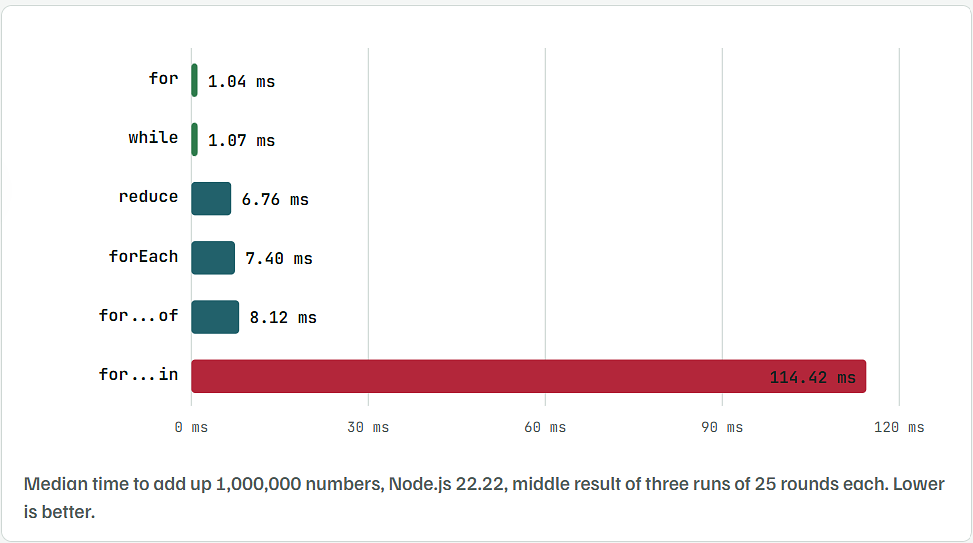
forandwhilewere about 7 times faster thanfor...of,forEachandreduce.for...inwas over 100 times slower thanfor, because it reads every index as a text key.- Put another way,
for...oftook about 8 nanoseconds per item. On an array of 1,000 items, every loop finishes in well under a millisecond. - Pick by readability for normal arrays. Reach for a classic
foronly on very large arrays in hot code, such as games or data processing.
Four Mistakes That Give Wrong Results
Using await Inside forEach
- What happens: the code after the loop runs before the saves finish, as in the test at the top.
- Fix: use
for...ofto go one at a time, orPromise.allto run them together.
const results = await Promise.all(cart.map(item => save(item)));
Output
[ 'Mouse', 'Keyboard', 'Cable' ]
Trying to break Out of forEach
breakinside forEach is a SyntaxError: Illegal break statement.returninside forEach only skips the current item. In our test, returning on 3 in[1, 2, 3, 4]still ran 4, giving[1, 2, 4].- Fix: use
for...ofwithbreak, orfind()/some().
Using for…in on an Array
const arr = ['a', 'b'];
arr.extra = 'x';

for (const key in arr) console.log(key, typeof key);
Output
0 string
1 string
extra string
- The index comes back as text, so
key + 1gives"01", not1. - Any extra property on the array shows up as if it were an item.
- MDN recommends a
forloop,forEach()orfor...offor arrays instead.
Forgetting Return in Map()
[1, 2, 3].map(x => { x * 2; });
Output
[ undefined, undefined, undefined ]
- Curly braces need the word
return. - Fix:
[1, 2, 3].map(x => x * 2), or{ return x * 2; }.