

- FineProxy fits scrapers that need large static datacenter pools billed per IP with unmetered traffic.
- PapaProxy suits SaaS teams buying proxies wholesale on an invoice. Good for bulk purchases.
- ProxyElite is the choice for small packages and traffic-billed rotation. Solo and small teams can take good advantage of it.
- Decodo has the lowest entry price for shared datacenter IPs. But Shared datacenter IPs are already highlighted in the blockers.
- IPRoyal lets you start with a single proxy. Can be great for quick testing, low-volume tasks.
- Rayobyte offers city choice on static datacenter IPs.Useful when target sites localize content or restrict access by city rather than just country or region.
- Bright Data fits enterprise teams that also want scraping APIs. structured data pipelines alongside raw proxy infrastructure instead of maintaining everything in-house
The right pick depends less on pool size than on how the provider bills traffic and which error your scraper keeps returning.
Prices and limits checked on providers’ pages in November 2026.
| Provider | Best for | Proxy types | Protocols | Pricing unit and entry price | Auth / trial |
| FineProxy | Large static pools, unmetered traffic | Datacenter, dedicated, ISP, rotating | HTTP, HTTPS, SOCKS4, SOCKS5, HTTP/2; UDP add-on | Per IP: $0.12 for 100 IPs, 30 days | IP allowlist, optional login; 48-hour paid test |
| PapaProxy | Wholesale orders on invoice | Datacenter, dedicated, ISP, rotating | HTTP, HTTPS, SOCKS4, SOCKS5 | Per IP: $0.19 for 100 IPs; 1M requests for $25 | IP allowlist, optional login; 48-hour paid test |
| ProxyElite | Small packages, rotation billed per GB | Datacenter, ISP, rotating | HTTP, HTTPS, SOCKS4, SOCKS5 | Per IP: $0.15 under 1,000 IPs; 10 GB rotating for $30 | IP allowlist, optional login; 48-hour paid test |
| Decodo | Cheapest shared datacenter entry | Residential, mobile, datacenter, ISP | HTTP, HTTPS, SOCKS5 | Per IP: $3.50 for 100 shared IPs a month | Login or IP whitelist; 3-day free trial on most products |
| IPRoyal | Starting with one proxy | Residential, ISP, datacenter, mobile | HTTP, HTTPS, SOCKS5 | Per proxy: datacenter from $1.57, 30 days | Login or IP whitelist; 24-hour ISP plan for $1.80 |
| Rayobyte | City choice on static datacenter IPs | Datacenter, ISP, residential, mobile | HTTP, HTTPS, SOCKS5 | Per IP: $2.50 for US datacenter (5–99 IPs) | Login or IP whitelist; 2-day money-back |
| Bright Data | Enterprise teams using scraping APIs | Datacenter, ISP, residential, mobile | HTTP, HTTPS, SOCKS5 | Per IP: $1.40 for 10 shared IPs; or $0.60/GB | Login required, allowlist on top |
Match The Error To The Fix
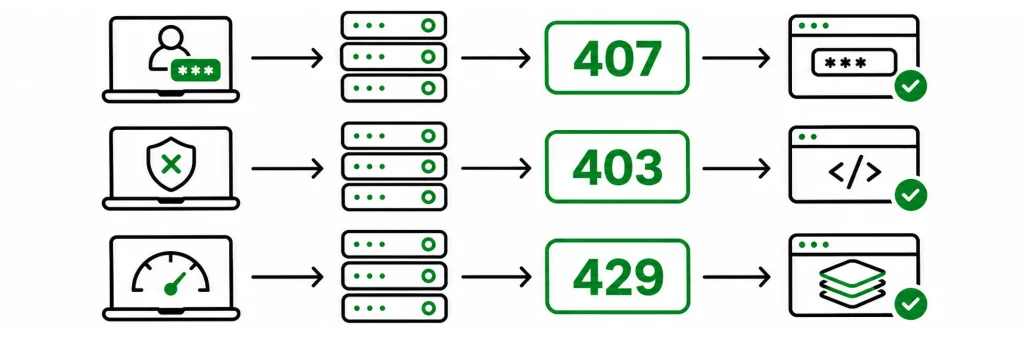
Most proxy problems in Python and Node.js show up as one of five errors. Each points to a different cause, and only some of them are solved by switching providers.
407 Proxy Authentication Required
A 407 response comes from the proxy, not the target site, and means the proxy rejected your credentials. The two usual causes are a password with characters like @, : or # that weren’t URL-encoded in the proxy string, and a server whose IP isn’t on the provider’s allowlist. Encode the login and password before building the URL, and add the public IP of every machine that runs the scraper, including CI runners.
403 Forbidden
A 403 from the target site usually means it doesn’t trust the IP range. Datacenter ranges are easy to identify, so strict sites may block them while accepting ISP addresses that are registered to internet providers. Before buying a different proxy type, check your request headers a default python-requests or node user agent gets blocked on many sites regardless of the IP behind it.
429 Too Many Requests
A 429 means you’ve exceeded the target’s rate limit for one address. The fix is fewer requests per IP: spread the load across a larger pool and respect the Retry-After header when the site sends it. This is where per-IP pricing matters, because adding 500 static IPs costs a predictable amount while the traffic stays unmetered.
ProxyError, ECONNRESET and ETIMEDOUT
Connection resets and timeouts through a proxy often mean you’ve hit the provider’s concurrent connection limit, or your network blocks the proxy port. Check the plan’s connection cap before raising concurrency in asyncio or Promise.all, and try an alternative port if outbound traffic from your office or cloud network is filtered.
SSL Errors When Connecting to The Proxy
An SSL error before any response usually means the proxy URL uses https:// while the proxy only speaks plain HTTP on that port. Use http:// in the proxy address for a regular HTTP proxy; the connection to an HTTPS site is still encrypted end to end through the CONNECT tunnel.
Set a Proxy in Python and Node.js
In Python’s requests library, pass the same proxy URL for both schemes and encode the credentials:
import requests
from urllib.parse import quote

proxy = f"http://{quote(USER, safe='')}:{quote(PASSWORD, safe='')}@PROXY_IP:8080"
r = requests.get("https://httpbin.org/ip", proxies={"http": proxy, "https": proxy}, timeout=15)
print(r.status_code, r.text)
In Node.js, the built-in fetch accepts an undici ProxyAgent as its dispatcher. undici reads the login and password from the proxy URL and decodes them, so encode them when you build it:
import { ProxyAgent, fetch } from "undici";

const agent = new ProxyAgent(
  `http://${encodeURIComponent(USER)}:${encodeURIComponent(PASSWORD)}@PROXY_IP:8080`
);
const res = await fetch("https://httpbin.org/ip", { dispatcher: agent });
console.log(res.status, await res.text());
With IP allowlisting, drop the credentials from the URL: the proxy recognizes the server by its address.
1. FineProxy: Static Datacenter Pools Billed Per IP
FineProxy suits Python and Node.js scrapers that run on fixed servers and need hundreds or thousands of static IPs without a traffic meter. Its pricing page lists datacenter packages at 0.12perIPfor100IPsfor30days(12), dropping to $0.075 per IP at 10,000 IPs, and traffic on static plans isn’t metered. Package IPs are shared by up to five customers; dedicated IPs start at $2 per IP for jobs that need an address of their own.
FineProxy ties access to your IP: you add each server’s address to the allowlist and can add a login and password on top of it. Each proxy answers on HTTP, HTTPS, SOCKS4 and SOCKS5, HTTP/2 is supported, and UDP over SOCKS5 is a paid option (+50% to the package). HTTPS means real TLS between your client and the proxy, with a certificate on each IP; not every library supports this mode, so the regular HTTP mode stays available.
FineProxy counts concurrent connections by tier: packages under 1,000 IPs get 1,500, and larger packages scale with IP count, which is the number to check before raising concurrency. The dashboard shows P50/P95 latency, success rate and abuse status per IP, and any IP can be replaced in one click. A REST API with 49 operations (OpenAPI 3.1) covers ordering and IP lists from code.
FineProxy targets by country only, and mail ports and .gov sites are closed. A 48-hour paid test lets you run your own scraper on the addresses before paying for a month. Pick it when your scraper needs a large static pool and you’d rather pay per IP than per gigabyte.
2. PapaProxy: Wholesale Proxies For SaaS Data Teams
PapaProxy is built for SaaS companies that collect data at volume, such as price monitoring, marketplace tracking or datasets for AI, and buy proxies through finance rather than a personal card. Its pricing page lists datacenter packages at $0.19 per IP for 100 IPs and $0.0729 per IP at 10,000 IPs, from a pool of 100,000+ IPv4 addresses in 21 countries plus mixed packages.
PapaProxy also sells rotating datacenter access billed by requests: 1 million requests over 30 days for $25, with a new IP on each request and sticky sessions when a job needs to keep one. For business orders, it offers invoices and wire transfers, a personal manager and deferred payment for approved clients. It makes sense if procurement needs an invoice before the scraper gets its proxies.
3. ProxyElite: Small Packages And Traffic-Billed Rotation
ProxyElite fits side projects and small scrapers that start with a few hundred IPs. Its configurator lists $0.15 per IP below 1,000 IPs and $0.07 per IP from 10,000, with a 100-IP minimum and as little as one IP per country in a mixed order. Longer terms get 10%, 15% or 20% off for 3, 6 or 12 months.
ProxyElite bills rotating proxies by traffic: rotating datacenter starts at $30 for 10 GB over 30 days, and rotating ISP at $75 for 10 GB. That model suits scrapers that make few but light requests, where paying per gigabyte costs less than renting a static pool. Choose it for a small, predictable budget.
4. Decodo: Lowest Entry Price for Shared Datacenter IPs
Decodo, formerly Smartproxy, lists 100 shared datacenter IPs for $3.50 a month on its pricing page, the lowest entry point in this list, alongside residential, mobile and ISP proxies in the same account. Its help center describes a 3-day free trial on most products and both username-and-password and IP whitelist authentication.
Decodo’s documentation states that only ports 80, 443, 563, 8443 and 43 are open on datacenter and ISP proxies, which matters if your scraper calls an API on a custom port. Its public API doesn’t cover datacenter and ISP proxies, so IP lists and whitelists are managed in the dashboard. It’s a good start for testing an idea on a low budget.
5. IPRoyal: Start With a Single Proxy
IPRoyal lets you buy one datacenter proxy from $1.57 for 30 days, or one ISP proxy for 24 hours at $1.80, according to its pricing pages. That’s useful for debugging a scraper against one target before committing to a pool. The same account covers residential traffic from 1 GB that, per its docs, doesn’t expire on pay-as-you-go.
IPRoyal’s fair-usage policy includes 100 GB per datacenter or ISP proxy per 30 days, after which speed drops unless you buy extra data. Its help center also says each static proxy works from one source IP by default, so running the same scraper from a laptop and a CI runner costs extra. Skip it if a few IPs carry heavy traffic.
6. Rayobyte: City Choice On Static Datacenter IPs
Rayobyte sells static datacenter IPs in 29 countries, with city selection in the US and parts of Europe, at $2.50 per IP for 5–99 US IPs and 25% less from 1,000 IPs, according to its product page. Static plans come with a 2-day money-back window and a 99.9% uptime SLA with service credits.
Rayobyte’s support pages state that SOCKS5 on static IPs is TCP only, and its terms define heavy use at 30 GB per IP over 30 days. Crypto isn’t accepted, and orders start at 5 IPs. It’s worth it when a scraper has to hit a target from a specific US city.
7. Bright Data: Enterprise Scraping With APIs on Top
Bright Data suits enterprise teams that want proxies and ready-made scraping tools from one vendor. Its pricing page lists shared datacenter IPs at $1.40 per IP for 10 IPs, or pay-as-you-go traffic at $0.60 per GB, and its documentation covers most account actions through an API.
Bright Data has two details that often break existing scrapers. According to its docs, the HTTP and HTTPS proxy port moved to 44445, and the certificates on the old ports 22225 and 33335 expired on September 25, 2026, so scripts still pointing there fail with SSL errors. SOCKS5 works only with remote DNS and domain names, and requests to explicit IP addresses through it are blocked. IP allowlisting also works on top of a username and password, not instead of them. It’s a fit for teams that need compliance reviews and APIs more than the lowest price.
Datacenter, ISP or Rotating?

- Consider datacenter IPs when the target doesn’t block hosting ranges and you need volume at the lowest cost per request.
- Consider ISP IPs when a site returns 403 to datacenter ranges but accepts addresses registered to internet providers.
- Consider rotating proxies when the job sends many short requests and you don’t need to keep one IP per session.
Before You Scale a Scraper
- Test the provider on your real target for 24–48 hours before paying for a month.
- Check the concurrent connection limit and set your asyncio or Promise.all concurrency below it.
- Add every server and CI runner to the allowlist, or URL-encode the credentials.
- Log status codes per proxy so you can tell a 407 from a 403 or a 429.
- Compare the cost per IP with the cost per GB for your actual traffic.