

I am going to build a software tool that automates making posts and comments on a social media platform. ChatGPT will provide the text. It also has to log in to many accounts, track the posts for broken links (404) and find-and-replace those links. Which code language should be used: Python or JavaScript (Node.js + Next.js)?
Question posted on r/developers
Build the bot in Python. Every job on that list is easier in Python: calling the ChatGPT API, driving a browser for each account, running a nightly link check and swapping bad links in a database. Add Next.js later, and only if you want a web page to watch it all from. Below is the reasoning, then the whole tool in five steps with working code.
Why Python Wins for This Kind of Tool
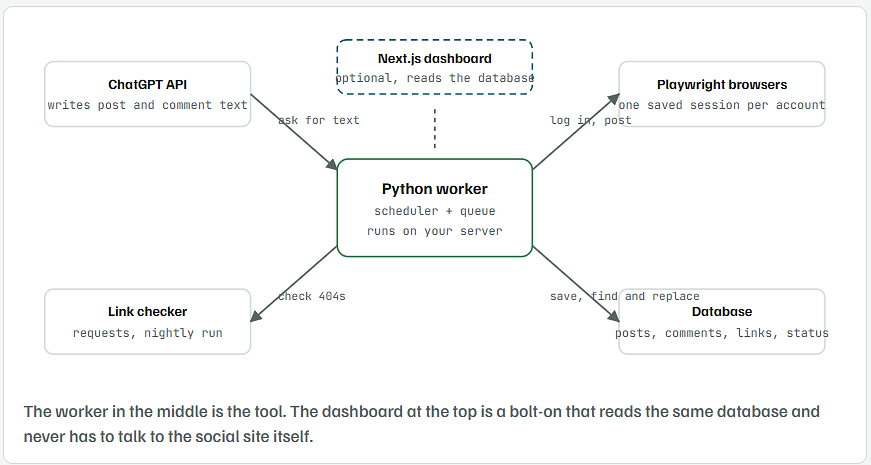
Your tool is a background worker, not a website. It wakes up, writes text, logs in, posts, checks links and goes back to sleep. That is the kind of program Python was built for, and the three libraries it needs are mature.
- Browser automation: Playwright has Python and Node versions with the same features. No advantage either way, but the Python version pairs with everything else here.
- ChatGPT: OpenAI ships an official Python SDK and an official Node SDK. Same calls, same models.
- Scheduling and queues: APScheduler for cron-style jobs and Celery or RQ for queues are standard in Python. Node has equivalents, but you’ll be wiring them up yourself.
- Link checking and text handling:
requestsplus a regex is a 20-line script in Python. The same job in Node needs more boilerplate around promises and streams. - Hosting: a Python script runs on any $5 VPS with a cron entry or a systemd service. No build step, no bundler.
Pick Node.js plus Next.js instead if one of these is true: you already have a Next.js app and want this inside it, your team only knows JavaScript, or the dashboard matters more than the bot. In that case keep the worker in Node and skip Python altogether. Running two languages for one small tool doubles the upkeep.
| Job in your tool | Python | Node.js + Next.js |
|---|---|---|
| Generate text with ChatGPT | openai SDK, 10 lines | openai SDK, 10 lines |
| Log in and post as many accounts | Playwright, saved session per account | Playwright, same |
| Scheduled runs | APScheduler or cron | node-cron, or an external cron |
| Check links for 404 | requests + regex | fetch + regex, more async handling |
| Find and replace links in stored posts | plain loop over the database | plain loop over the database |
| Web dashboard | Flask or FastAPI, basic look | Next.js, best in class |
| Hosting the worker | any VPS, cron or systemd | VPS with pm2, or a serverless cron with time limits |
Read the Platform Rules Before You Write the First Line
Logging into many accounts with a script and posting on their behalf breaks the terms of most large platforms, and the same tool that posts can get every account banned in one afternoon.
- Use the official API where one exists. Reddit, X, Meta (Facebook and Instagram), LinkedIn and YouTube all have developer APIs with rules for automated posting. An API key is harder to lose than a password-based login.
- Keep browser automation for platforms with no API, and for your own accounts only.
- Label automated accounts where the platform asks for it. Reddit, for example, expects bot accounts to say so.
- Space posts out. Dozens of comments in a minute from fresh accounts is the exact pattern spam filters look for.
Set Up the Python Project
mkdir social-bot && cd social-bot
python3 -m venv .venv
source .venv/bin/activate        # Windows: .venv\Scripts\activate
pip install openai playwright requests apscheduler
playwright install chromium
- Put your OpenAI key in an environment variable called
OPENAI_API_KEY. Never paste it into the code. - Make a
sessionsfolder for saved logins and aposts.jsonfile (or a SQLite database once you pass a few hundred posts).
Get the Post Text From ChatGPT
from openai import OpenAI

client = OpenAI()  # reads OPENAI_API_KEY from your environment

def write_post(topic, link, tone="plain and friendly"):
    prompt = (
        f"Write a social media post of at most 60 words about {topic}. "
        f"End with this exact link: {link}. Tone: {tone}. No hashtags."
    )
    response = client.responses.create(model="gpt-4.1-mini", input=prompt)
    return response.output_text.strip()

if __name__ == "__main__":
    print(write_post("our new pricing page", "https://example.com/pricing"))
- Keep the prompt strict: a word limit, the exact link, and “no hashtags” if you don’t want them. Loose prompts produce posts that read like ads.
- Save the generated text to your database before posting it, so you can compare it later with what is actually on the page.
- The model name goes in one place so you can swap it when a cheaper one comes out.
Log In Once Per Account and Post With Playwright
The trick for “many accounts” is a saved browser session for each one. You log in by hand the first time, Playwright saves the cookies to a file, and every later run reuses that file.
playwright codegen https://example-social.com/login --save-storage=sessions/shop_main.json
A browser opens. Log in as that account, close the window, and the session is saved. Repeat for each account. Then the posting script needs no passwords at all:
import asyncio
from playwright.async_api import async_playwright

async def post_with_account(account, text):
    async with async_playwright() as p:
        browser = await p.chromium.launch(headless=True)
        # one saved session per account, so you log in once and reuse it
        context = await browser.new_context(storage_state=account["state_file"])
        page = await context.new_page()
        await page.goto("https://example-social.com/compose")
        await page.fill("textarea[name='body']", text)
        await page.click("button:has-text('Post')")
        await page.wait_for_url("**/post/**")
        url = page.url
        await context.storage_state(path=account["state_file"])
        await browser.close()
        return url

async def main():
    accounts = [
        {"name": "shop_main", "state_file": "sessions/shop_main.json"},
        {"name": "shop_uk", "state_file": "sessions/shop_uk.json"},
    ]
    for account in accounts:
        url = await post_with_account(account, "Hello from the scheduler.")
        print(account["name"], "posted", url)
        await asyncio.sleep(90)  # space the accounts out

asyncio.run(main())
- Replace the URL and the two selectors (
textarea[name='body']and the Post button) with the ones on your platform. Playwright’s codegen shows you the right selectors as you click. - The function returns the new post’s URL. Store it with the post ID. That URL is what the tracker checks later.
- The 90-second gap between accounts is not decoration. Drop it and the platform sees one machine posting as several people.
Track Broken Links and Replace Them
This script does both jobs from the question, it finds every link in your stored posts, reports the ones that don’t return 200, and swaps a bad link for a good one everywhere it appears. I ran it against a small test site with one missing page.
import json
import re
import requests

URL_PATTERN = re.compile(r"https?://[^\s)\]>\"']+")


def check_url(url, timeout=10):
    """Return the HTTP status for a link, or 0 if the site did not answer."""
    try:
        r = requests.head(url, allow_redirects=True, timeout=timeout)
        if r.status_code in (403, 405):  # some sites refuse HEAD, try GET
            r = requests.get(url, allow_redirects=True, timeout=timeout, stream=True)
        return r.status_code
    except requests.RequestException:
        return 0


def find_broken(posts):
    """posts is a list of dicts with 'id' and 'text'. Returns the broken links."""
    broken = []
    for post in posts:
        for url in URL_PATTERN.findall(post["text"]):
            status = check_url(url)
            if status != 200:
                broken.append({"post_id": post["id"], "url": url, "status": status})
    return broken


def replace_link(posts, old_url, new_url):
    """Swap a broken link for a working one in every stored post."""
    changed = []
    for post in posts:
        if old_url in post["text"]:
            post["text"] = post["text"].replace(old_url, new_url)
            changed.append(post["id"])
    return changed


if __name__ == "__main__":
    with open("posts.json") as f:
        posts = json.load(f)

    broken = find_broken(posts)
    for b in broken:
        print(f"Post {b['post_id']}: {b['url']} returned {b['status']}")

    if broken:
        fixed = replace_link(posts, broken[0]["url"], "http://127.0.0.1:8900/new-guide.html")
        print(f"Replaced in posts: {fixed}")
        with open("posts.json", "w") as f:
            json.dump(posts, f, indent=2)
What you should see
Post 102: http://127.0.0.1:8900/old-guide.html returned 404
Post 103: http://127.0.0.1:8900/old-guide.html returned 404
Replaced in posts: [102, 103]
check_urltries a HEAD request first because it is light. Some sites block HEAD, so it falls back to GET.- A status of 0 means the site never answered. Treat that as broken too, but re-check before you replace it, since it may just be down for a minute.
replace_linkedits your stored copy. To fix the live post as well, call the platform’s edit endpoint or reopen the post in Playwright and update it.- Posts that vanish: run
check_urlon the post’s own URL as well as the links inside it. A 404 on the post URL means it was removed.
Run It on a Schedule
from apscheduler.schedulers.blocking import BlockingScheduler
from link_check import find_broken
import json

def nightly_check():
    posts = json.load(open("posts.json"))
    broken = find_broken(posts)
    if broken:
        print("Broken links found:", broken)   # swap for an email or Slack message

scheduler = BlockingScheduler()
scheduler.add_job(nightly_check, "cron", hour=2, minute=0)
scheduler.start()
- Add a second job for posting, for example every morning at 9 with a random delay of a few minutes.
- Run
scheduler.pyunder systemd or pm2 on your server so it restarts after a reboot. - Send the broken-link report somewhere you’ll see it: an email through SMTP, a Slack webhook or a Telegram bot. All three are a few lines in Python.
When to Add the Next.js Dashboard
- Add it when someone who isn’t you needs to see post status, approve generated text, or fix links by hand.
- Expose the worker’s database through a small FastAPI service with three routes: list posts, list broken links, replace a link. Next.js calls those routes.
- Keep all browser automation in the Python worker. A Next.js API route that opens Chromium will time out on most hosting.
- Until then, a daily email with the broken-link list does the same job for free.
You can watch this video to learn how I make a complete video tutorial.