



Tedious, the driver sitting under the mssql package, has exactly one place where it prints Port for ... not found in .... Here’s what that bit of code does, cut down to plain steps:
// What tedious does when your config has an instance name (written short)
send one byte (0x02) to  MyServer : UDP 1434        // SQL Server Browser
reply = "InstanceName;SQLEXPRESS;...;tcp;1433;;"

for each instance in reply:
    if instance.name == "MySQLInstanceName":       // case doesn't matter
        return instance.tcp                         // -> then connect on TCP

throw "Port for MySQLInstanceName not found in MyServer"
So Node did reach your server. SQL Server Browser answered it with a list of instances, and the name in your config wasn’t on that list. Port 1433, the firewall rule and the TCP/IP settings don’t get a look in, because the driver gives up before it ever opens a TCP connection. On SQL Server 2022 Express the real instance name is nearly always SQLEXPRESS, unless somebody typed a different one during setup.

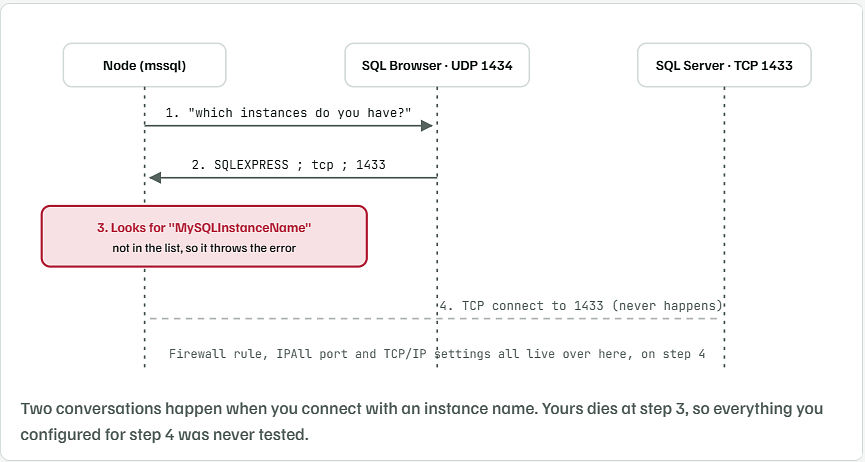
Ask SQL Browser Yourself What It Has Listed
Before changing any setting, find out what the Browser service really says. Save this as browser-check.mjs next to your web server code. It sends the very same one-byte question tedious sends and prints the answer.
// Ask SQL Server Browser (UDP 1434) which instances it knows and on which TCP port.
// Usage: node browser-check.mjs [server] [instanceName]
import dgram from 'node:dgram';

const server = process.argv[2] || '127.0.0.1';
const wanted = process.argv[3] || '';
const port = Number(process.env.BROWSER_PORT || 1434);

const socket = dgram.createSocket('udp4');
const timer = setTimeout(() => {
  console.log(`No answer from SQL Browser on ${server}:${port}.`);
  console.log('Check that the "SQL Server Browser" service is Running.');
  socket.close();
}, 3000);

socket.on('error', (err) => {
  clearTimeout(timer);
  console.log(`SQL Browser did not answer: ${err.code}`);
  socket.close();
});

socket.on('message', (msg) => {
  clearTimeout(timer);
  const text = msg.subarray(3).toString('ascii');
  const blocks = text.split(';;').filter(Boolean);
  console.log(`SQL Browser on ${server} lists ${blocks.length} instance(s):\n`);
  let found = false;
  for (const block of blocks) {
    const parts = block.split(';');
    const info = {};
    for (let i = 0; i < parts.length - 1; i += 2) info[parts[i]] = parts[i + 1];
    const tcp = info.tcp || 'TCP is OFF for this instance';
    console.log(`  ${info.InstanceName.padEnd(16)} tcp port: ${tcp}`);
    if (wanted && info.InstanceName.toUpperCase() === wanted.toUpperCase()) found = true;
  }
  if (wanted) {
    console.log(found
      ? `\n"${wanted}" is listed. Use that exact name.`
      : `\n"${wanted}" is NOT listed. This is why Node says "Port for ${wanted} not found".`);
  }
  socket.close();
});

socket.send(Buffer.from([0x02]), port, server);
Run it on the server, giving it the instance name you have in your config:
node browser-check.mjs 127.0.0.1 MySQLInstanceName
What it prints when the name is wrong
SQL Browser on 127.0.0.1 lists 1 instance(s):

  SQLEXPRESS       tcp port: 1433

"MySQLInstanceName" is NOT listed. This is why Node says "Port for MySQLInstanceName not found".
A Different Name Shows Up In The List
That’s your answer. Copy the name exactly as printed. If the line says TCP is OFF for this instance, then TCP/IP got switched on for some other instance in Configuration Manager, so open SQL Server Network Configuration → Protocols for SQLEXPRESS and enable it there.
Nothing Comes Back At All
You’d get No answer from SQL Browser. Open services.msc, find SQL Server Browser, set Startup type to Automatic and press Start. On a fresh Express install it’s usually set to Disabled, so a plain restart from Configuration Manager won’t stick.
Drop the Instance Name and Connect Straight to 1433
You already gave the instance a fixed port, so Node doesn’t need the Browser at all. Take the instance name out and hand the driver the port. The mssql README says it too: don’t set port when you connect by instance name, and the reverse works just as well. Pick one.
const config = {
  server: 'MyServer\\MySQLInstanceName',   // or options.instanceName
  database: 'MyDatabase',
  user: 'app_user',
  password: process.env.DB_PASSWORD,
};
const sql = require('mssql');

const config = {
  server: '127.0.0.1',          // web server and SQL are on one machine
  port: 1433,                   // the port you set under IPAll
  database: 'MyDatabase',
  user: 'app_user',
  password: process.env.DB_PASSWORD,
  options: {
    encrypt: true,
    trustServerCertificate: true  // Express ships with a self-signed cert
  }
};

async function getPool() {
  if (!getPool.pool) getPool.pool = await sql.connect(config);
  return getPool.pool;
}

module.exports = { sql, getPool };
And a quick route your PowerShell script can hit to prove it’s talking to SQL:
const { getPool } = require('./db');

app.get('/db-check', async (req, res) => {
  try {
    const pool = await getPool();
    const r = await pool.request().query(
      "SELECT @@SERVERNAME AS server, SERVERPROPERTY('InstanceName') AS instance"
    );
    res.json(r.recordset[0]);
  } catch (err) {
    res.status(500).send(err.message);
  }
});
Invoke-RestMethod http://localhost:3000/db-check
What you should see
server               instance
------               --------
MYSERVER\SQLEXPRESS  SQLEXPRESS
You Can Keep the Instance Name If You Prefer
Some people want the config to read like the SSMS login box. That’s fine. Use the name the Browser check printed, leave port out, and the Browser service has to stay running:
const config = {
  server: 'localhost',
  database: 'MyDatabase',
  user: 'app_user',
  password: process.env.DB_PASSWORD,
  options: {
    instanceName: 'SQLEXPRESS',
    encrypt: true,
    trustServerCertificate: true
  }
};
Got the name from a .env file as MyServer\SQLEXPRESS? Use one backslash in .env and two inside a JavaScript string. A single backslash in JS quietly vanishes, and the driver then sees MyServerSQLEXPRESS as the server name.
Make Sure 1433 Belongs to This Instance
Setting 1433 under IPAll isn’t the whole job. In SQL Server Configuration Manager → Protocols for SQLEXPRESS → TCP/IP → IP Addresses, scroll down to IPAll:
- TCP Dynamic Ports: empty. Delete the 0 if there is one.
- TCP Port: 1433
- Restart SQL Server (SQLEXPRESS) afterwards.
Then ask the server which port your own session came in on. sqlcmd can reach it over shared memory, so this works even while TCP is broken:
sqlcmd -S .\SQLEXPRESS -E -Q "SELECT local_tcp_port FROM sys.dm_exec_connections WHERE session_id = @@SPID"
sqlcmd -S tcp:127.0.0.1,1433 -E -Q "SELECT @@SERVERNAME"
Test-NetConnection 127.0.0.1 -Port 1433
The line to look for from the last command
TcpTestSucceeded : True
The first command prints NULL because it isn’t using TCP. That’s expected. The second one is the real test. If it connects, Node will too, using the fixed config above.
Login Failed Is Usually the Next Error
Once the port problem is gone, plenty of people run straight into Login failed for user 'app_user'. Express installs with Windows Authentication only, and the mssql package with its default driver logs in with a SQL user and password. Here’s how to switch on both:
- In SSMS, right-click the server → Properties → Security.
- Pick SQL Server and Windows Authentication mode, click OK.
- Restart the SQL Server service.
- Create a login for the app, then give it access to your database:
CREATE LOGIN app_user WITH PASSWORD = 'Use-A-Long-Password-Here-2026';
USE MyDatabase;
CREATE USER app_user FOR LOGIN app_user;
ALTER ROLE db_datareader ADD MEMBER app_user;
ALTER ROLE db_datawriter ADD MEMBER app_user;
Your Firewall Rule Was Fine All Along
Since Node and SQL Server sit on one box and you’re connecting to 127.0.0.1, Windows Firewall doesn’t filter that traffic in the first place. Your inbound rule for 1433 only starts to matter once some other machine connects. Same for the UDP 1434 rule people suggest for the Browser service: you’ll want it when another PC on the network connects by instance name, and you don’t need it for a web server talking to its own database. None of the settings you changed were wrong. They just sit on the TCP side of the connection, and the error came from the UDP question asked before any of that.