

To build a Manifold style decentralized prediction market analytics tool with JavaScript, follow these seven steps:
- Set up your Node.js and React project.
- Connect to a prediction market API like Manifold Markets using
fetch. - Normalize the raw JSON response into a clean internal data model.
- Compute core analytics metrics such as probability velocity, liquidity score, and calibration curves.
- Visualize the results with a charting library like Recharts.
- Add a decentralized layer by aggregating data across multiple markets or storing snapshots on IPFS.
- Schedule regular data refreshes with a cron job.
The complete foundation can be built in under 200 lines of core JavaScript, and each step below includes working code you can copy and extend.
Why Prediction Market Analytics Matter
Raw market prices only tell part of the story. The real insight comes from deeper questions:
- How has this probability moved over time.
- Which traders are historically most accurate.
- Are similar markets on different platforms pricing the same event consistently.
- Is unusual volume signaling insider information.
Set Up Your Project
Start with a fresh Node.js project. Open your terminal and run:
mkdir prediction-analytics && cd prediction-analytics
npm init -y
npm install node-fetch recharts react react-dom
npm install -D vite @vitejs/plugin-react
This gives you a minimal stack:
- Node.js – for data fetching and processing.
- React – for the dashboard UI.
- Recharts – for visualization.
- Vite – as the build tool.
If you prefer TypeScript, add typescript and @types/react. Everything here translates cleanly.
Create two folders:
src/lib/for your data and analytics codesrc/components/for the React dashboard components
Keeping these separate means you can later reuse the analytics logic in a backend worker without touching the UI.
Connect to the Prediction Market API
Manifold Markets exposes a public REST API that returns market data as JSON. The base endpoint is https://api.manifold.markets/v0/markets, which returns a paginated list.
Start with a minimal fetcher:
// src/lib/api.js
export async function fetchMarkets(limit = 100) {
  const response = await fetch(
    `https://api.manifold.markets/v0/markets?limit=${limit}`
  );
  if (!response.ok) {
    throw new Error(`API error: ${response.status}`);
  }
  return response.json();
}
For production use, add retry logic and a simple in-memory cache with a time-to-live (TTL). This prevents hammering the API during development and keeps the UI responsive:
const cache = new Map();

export async function fetchWithCache(url, ttlMs = 60000) {
  const cached = cache.get(url);
  if (cached && Date.now() - cached.timestamp < ttlMs) {
    return cached.data;
  }
  const response = await fetch(url);
  if (!response.ok) throw new Error(`API error: ${response.status}`);
  const data = await response.json();
  cache.set(url, { data, timestamp: Date.now() });
  return data;
}
Test it by calling fetchMarkets(10) and logging the result. You should see an array of market objects with fields like question, probability, volume, and createdTime.
Normalize the Data
Raw API responses are inconsistent and cluttered with fields you don’t need.
Before doing anything else, transform each market into a clean internal shape. This one step will save you hours of debugging later:
// src/lib/model.js
export function normalizeMarket(raw) {
  return {
    id: raw.id,
    question: raw.question,
    probability: raw.probability,
    volume: raw.volume ?? 0,
    createdAt: new Date(raw.createdTime),
    closesAt: raw.closeTime ? new Date(raw.closeTime) : null,
    isResolved: Boolean(raw.isResolved),
    outcome: raw.resolution ?? null,
    category: raw.groupSlugs?.[0] ?? 'uncategorized'
  };
}
The benefit here is insulation. If Manifold changes a field name tomorrow, you fix one function not fifty scattered references across your codebase.
Compute Core Analytics Metrics
This is where your tool becomes genuinely useful. Three metrics form a solid starting point.
Probability Velocity
Probability velocity measures how fast a market is moving. A stable market hovers around the same price; an active one swings.
Given a time series of probabilities, velocity is the derivative over a recent window:
// src/lib/metrics.js
export function probabilityVelocity(history) {
  if (history.length < 2) return 0;
  const recent = history.slice(-10);
  const first = recent[0];
  const last = recent[recent.length - 1];
  const hoursDelta = (last.timestamp - first.timestamp) / 3_600_000;
  return hoursDelta > 0
    ? (last.probability - first.probability) / hoursDelta
    : 0;
}
Liquidity Score
Liquidity score indicates whether a market’s price is trustworthy.
A market with $10 in volume can be moved by a single trader. A market with $10,000 in volume reflects a robust consensus. A log-scaled score works well:
export function liquidityScore(market) {
  return Math.log10(market.volume + 1);
}
Calibration
Calibration is the most valuable metric of all. It answers the critical question: when the market says “70%,” do those events actually happen 70% of the time.
You compute it by bucketing resolved markets by their final probability and measuring the actual resolution rate in each bucket:
export function calibrationCurve(resolvedMarkets, bucketCount = 10) {
  const buckets = Array.from({ length: bucketCount }, () => ({
    total: 0,
    yes: 0
  }));
  for (const m of resolvedMarkets) {
    const idx = Math.min(
      Math.floor(m.probability * bucketCount),
      bucketCount - 1
    );
    buckets[idx].total += 1;
    if (m.outcome === 'YES') buckets[idx].yes += 1;
  }
  return buckets.map((b, i) => ({
    predicted: (i + 0.5) / bucketCount,
    actual: b.total > 0 ? b.yes / b.total : null,
    sampleSize: b.total
  }));
}
Plotting predicted against actual gives you a calibration chart. The closer the curve hugs the diagonal, the better-calibrated the market.
Visualize the Results
Raw numbers are useless for end users.
Recharts makes it simple to render a calibration curve in React:
// src/components/CalibrationChart.jsx
import {
  LineChart,
  Line,
  XAxis,
  YAxis,
  Tooltip,
  ReferenceLine
} from 'recharts';

export function CalibrationChart({ data }) {
  return (
    <LineChart width={600} height={400} data={data}>
      <XAxis dataKey="predicted" type="number" domain={[0, 1]} />
      <YAxis dataKey="actual" type="number" domain={[0, 1]} />
      <Tooltip />
      <ReferenceLine
        segment={[{ x: 0, y: 0 }, { x: 1, y: 1 }]}
        stroke="gray"
      />
      <Line type="monotone" dataKey="actual" stroke="#3b82f6" />
    </LineChart>
  );
}
Pair this with a sortable table of active markets showing their current probabilities, volume, and velocity.
Users can then scan for markets that are moving fast or look underpriced relative to similar questions. A simple table component with column sorting takes around 40 lines of React and dramatically improves usability.
Add the Decentralize Layer
The word “decentralized” can mean a few things here, and which path you take depends on your goals.
Cross-Platform Aggregation
The most practical option is cross-platform aggregation. Wrap each major prediction market API Manifold, Polymarket, Kalshi, Metaculus in a function that returns your common market model.
When multiple platforms host markets on the same event, disagreements between them are a signal worth tracking. A 10-point spread between Manifold and Polymarket on the same question often indicates one side has better information or lower liquidity.
Tamper-Evident Storage
A second option is tamper-evident storage. Pushing market snapshots to IPFS gives you an immutable record of how probabilities evolved over time.
This matters for researchers who want to audit market behavior without trusting a single platform’s database. Libraries like ipfs-http-client make this a few lines of code.
On-Chain Integration
A third, more ambitious path is on-chain integration using ethers.js or viem. This lets you bridge your analytics directly with blockchain-based prediction markets.
Be aware: it’s a substantial project on its own and introduces gas cost considerations.
Schedule Regular Data Refreshes
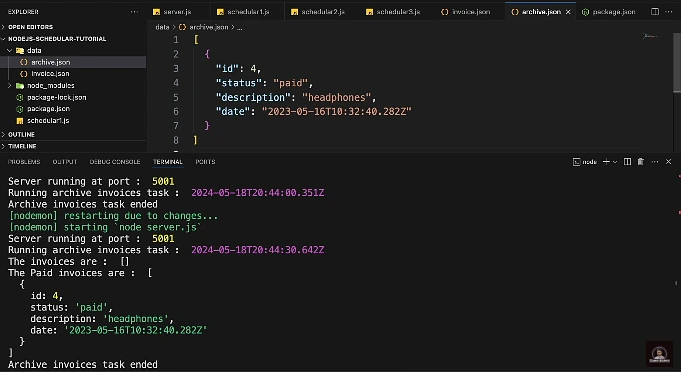
Analytics are only as good as the data behind them.
Set up a scheduled job to refresh your dataset:
- Every few minutes for active markets
- Hourly for resolved ones
Node’s node-cron works for simple setups:
// src/lib/scheduler.js
import cron from 'node-cron';
import { fetchMarkets } from './api.js';
import { normalizeMarket } from './model.js';
import { storeSnapshot } from './storage.js';

cron.schedule('*/5 * * * *', async () => {
  try {
    const markets = await fetchMarkets(500);
    const normalized = markets.map(normalizeMarket);
    await storeSnapshot(normalized);
    console.log(
      `Refreshed ${markets.length} markets at ${new Date().toISOString()}`
    );
  } catch (err) {
    console.error('Refresh failed:', err);
  }
});
For anything production-grade, upgrade to a proper queue like BullMQ or a managed scheduler like AWS EventBridge.
The key principle: your dashboard should always read from stored snapshots, never directly from the live API. This keeps it fast and resilient.
Pitfalls to Watch For
A few things will bite you if you’re not careful.
- Rate limits are the most common issue. Public APIs throttle aggressive clients, so build in exponential backoff and respect the response headers.
- Survivorship bias in calibration analysis is another trap. If you only look at resolved markets, you’re filtering out the ones that never closed which can skew results.
- Sample size honesty matters too. A calibration bucket with five markets in it is noise, not signal. Always display sample counts alongside your metrics so users can judge for themselves.
Where to Take It Next
Once the foundation is solid, the extensions write themselves.
You could build trader leaderboards ranking users by realized profit or Brier score. You could add anomaly detection that flags markets with sudden volume spikes. You could train a small model to find markets that look mispriced relative to historically similar ones.
If you plan to share your findings with a wider audience investors, research collaborators, or a conference talk turning your analytics into a clean visual narrative matters just as much as the underlying math.
Tools like Adobe’s AI presentation maker can take your exported charts and key metrics and assemble them into a polished deck in minutes. That lets you focus on the story your data is telling rather than on slide formatting.