

I recently ran into a frustrating error while building a Next.js 13 app. I was using axios to fetch API data inside getStaticProps(), but during the build, my app threw a “Module not found: Can’t resolve ‘debug’ in ‘…/node_modules/follow-redirects’” error.
At first, I thought reinstalling packages would fix it. But the deeper I dug, I realized there were actually two separate issues:
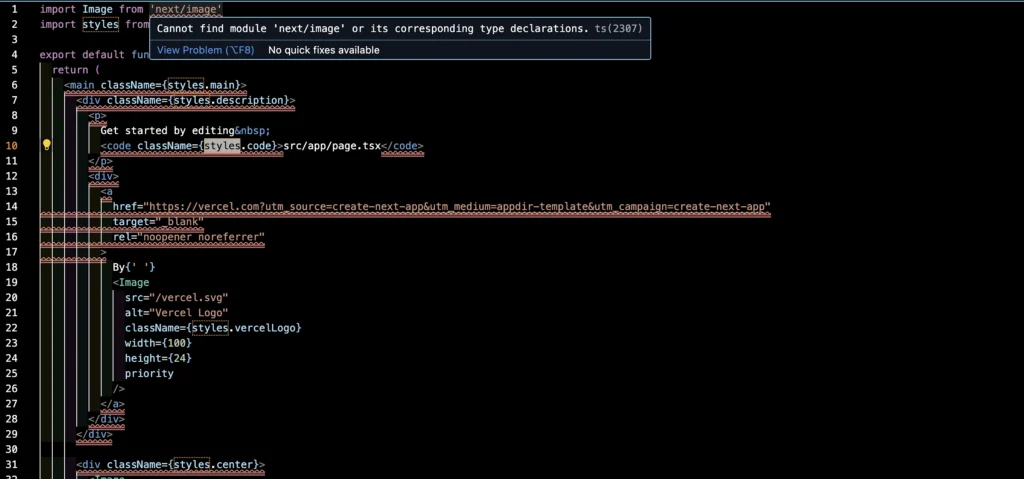
- A resolver error involving
follow-redirects → debug. - Incorrect usage of
getStaticProps()and even the wrong data-fetching model if you’re on the new App Router.
Axios & Next.js Module Errors: Causes & Fixes
- Fix for Yarn: Set
nodeLinker: node-modulesin your.yarnrc.yml. - Bundler Configuration: Next.js may fail to map Axios for the browser, causing
follow-redirectsordebugmodule errors. - Fix: Install the missing sub-dependency manually, or check
next.config.jsto ensure server modules aren’t being forced into client builds. - Environment Mismatches: Server-side functions (like
getServerSideProps) can sometimes fail to resolve local Node.js modules correctly. - Fix: Delete your
node_modulesand.nextfolders, then run a freshnpm installoryarn installto rebuild the dependency tree. - Case Sensitivity: Import casing mismatches often break deployments when moving from Windows to Linux-based environments (like Netlify).
- Fix: Ensure all import paths match the exact capitalization of your file system.
- Package Manager Quirks: Strict package managers (pnpm/Yarn) use symlinking that can hide the
follow-redirectsdependency from Axios. - Fix for pnpm: Add
public-hoist-pattern[] = follow-redirectsto your.npmrc.
The First Code
Here’s the original code I wrote inside getStaticProps:
// First attempt (WRONG)
export async function getStaticProps() {
  await axios.get('https://my-api-url.com/getlist')
    .then(response => {
      setData(response.data);
      setLoading(false);
    })
    .catch(error => {
      console.error('Error fetching data:', error);
      setLoading(false);
    });

  const data = await response.json();
  console.log(data);
}
What Wrong Here
- The “Module not found” error
axiosuses the Node adapterfollow-redirects, which has an optional dependency ondebug. In some Webpack/Next.js builds, that optional dependency still gets resolved at build time. Ifdebugisn’t installed, you’ll see this error. - Misuse of
getStaticPropsgetStaticPropsruns on the server at build time, so I can’t call React state setters likesetDataorsetLoading.- I also mistakenly mixed axios with
response.json(), which only works withfetch.
- App Router vs Pages Router confusion
My stack trace pointed tosrc/app/page.js, meaning I was on the App Router. In that case,getStaticPropsdoesn’t even exist I should be usingfetchin Server Components instead.
Fix the Build Error
The first thing I did was fix the follow-redirects error. Here are the commands I ran:
# Install the optional peer dependency
npm i debug

# Update axios
npm i axios@latest

# Clean and rebuild
rm -rf .next node_modules package-lock.json
npm i
npm run build
In most cases, installing debug clears the resolver problem. If you’re targeting the Edge Runtime, though, axios won’t work (it depends on Node APIs). In that case, I recommend switching to fetch.
Correct Data Fetching Pattern
The right fix depends on whether you’re in the Pages Router (pages/ folder) or the App Router (src/app/ folder).
Pages Router (with getStaticProps)
// pages/index.js
import axios from 'axios';

export async function getStaticProps() {
  const { data } = await axios.get('https://my-api-url.com/getlist');

  return {
    props: { initialData: data },
    revalidate: 3600, // re-build every hour
  };
}

export default function Home({ initialData }) {
  return (
    <main>
      <h1>Home</h1>
      <pre>{JSON.stringify(initialData, null, 2)}</pre>
    </main>
  );
}
No setState calls.
Return props.
Use revalidate for ISR (Incremental Static Regeneration).
App Router (no getStaticProps support)
If you’re using the App Router, you should use Server Components with fetch.
Use fetch (recommended)
// src/app/page.js
export const revalidate = 3600;

export default async function Page() {
  const res = await fetch('https://my-api-url.com/getlist');

  if (!res.ok) {
    return <div>Failed to load data.</div>;
  }

  const data = await res.json();

  return (
    <main>
      <h1>Home</h1>
      <pre>{JSON.stringify(data, null, 2)}</pre>
    </main>
  );
}
Stick with axios (Node.js runtime only)
// src/app/page.js
import axios from 'axios';
export const revalidate = 3600;

export default async function Page() {
  const { data } = await axios.get('https://my-api-url.com/getlist');
  return (
    <main>
      <h1>Home</h1>
      <pre>{JSON.stringify(data, null, 2)}</pre>
    </main>
  );
}
Bonus Practice Enhancement
Once I got the basics working, I decided to add more robust functionality to my project.
Axios Helper with Retry + Timeout
// src/lib/http.js
import axios from 'axios';

export const http = axios.create({
  timeout: 10_000,
});

http.interceptors.response.use(
  (res) => res,
  async (error) => {
    const cfg = error.config;
    if (!cfg) throw error;

    cfg.__retryCount = cfg.__retryCount ?? 0;

    const status = error.response?.status;
    const shouldRetry =
      cfg.method?.toLowerCase() === 'get' &&
      cfg.__retryCount < 2 &&
      (!status || status >= 500);

    if (!shouldRetry) throw error;

    cfg.__retryCount++;
    await new Promise((r) => setTimeout(r, 500 * cfg.__retryCount));
    return http(cfg);
  }
);
Now, transient network issues don’t break my build.
Validate Responses with Zod
import { z } from 'zod';

const Item = z.object({
  id: z.number(),
  name: z.string(),
});
const ApiSchema = z.array(Item);

const data = ApiSchema.parse(await res.json());
This gave me confidence that my API returned what I expected.
Client Side Fallback with SWR
'use client';

import useSWR from 'swr';
import axios from 'axios';

const fetcher = (url) => axios.get(url).then((r) => r.data);

export default function ListClient() {
  const { data, error, isLoading, mutate } = useSWR(
    'https://my-api-url.com/getlist',
    fetcher,
    { revalidateOnFocus: false }
  );

  if (isLoading) return <p>Loading…</p>;
  if (error) return (
    <div>
      <p>Failed to load. {error.message}</p>
      <button onClick={() => mutate()}>Retry</button>
    </div>
  );

  return <pre>{JSON.stringify(data, null, 2)}</pre>;
}
With this, users get a retry button instead of a blank error screen.