



- Windows is blocking one small Vortex file, not Vortex itself. The file is
winapi.node, a helper Vortex needs to talk to Windows. - The blocker is Windows Smart App Control, or a company App Control policy on a work PC.
- The quickest fixes, in order update Vortex, go back to the last version that worked, or, as a last resort, switch Smart App Control off.
- It is not a Java problem. The message says JavaScript, which is the language Vortex is built with.
A Vortex user posted this error after updating, with one detail that matters: it only happens with v2.4.2. Here is the error box they got:

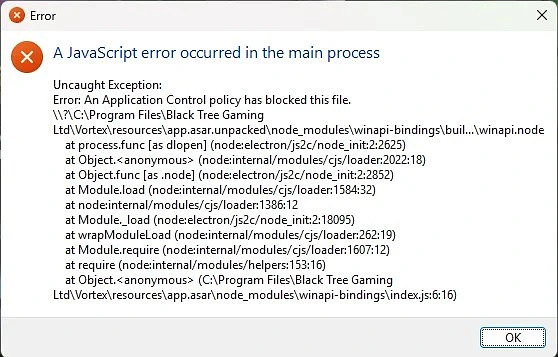
What Each Line of the Error Box Means
- “A JavaScript error occurred in the main process”
- Vortex is an Electron app, built from web code. “Main process” is the part that starts first. It crashed before any window opened.
- “An Application Control policy has blocked this file”
- This line comes from Windows, not Vortex. Windows refused to let a file load.
...winapi-bindings\buil...\winapi.node- This is the file Windows blocked. A
.nodefile is a small compiled program that the JavaScript code loads to reach Windows features.
- This is the file Windows blocked. A
C:\Program Files\Black Tree Gaming Ltd\Vortex- Black Tree Gaming Ltd is the company behind Nexus Mods. This confirms the file is part of the normal Vortex install, not a virus or leftover file.
Everything else in the box (process.func, Module.load, require) is Node.js listing the chain of calls that led to the load. You can ignore those lines.

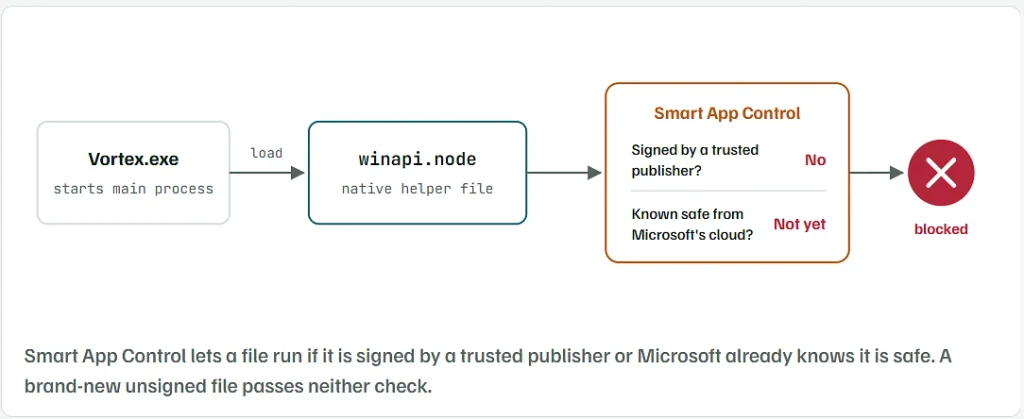
Why It Started With Vortex 2.4.2 and Not Before
- Smart App Control is a Windows 11 feature. It blocks files that are not signed and that Microsoft’s cloud service has not seen enough to call safe.
- Every Vortex update ships freshly built copies of its helper files. A new build of
winapi.nodehas a new fingerprint, so its reputation starts from zero. - If that file is unsigned, Smart App Control blocks it on day one. Older versions kept working because their copies of the file were already known.
- The same block hit other Electron apps, including 1Password, Cursor and Google’s Antigravity editor, each on the same
.nodefile type.
This is a likely explanation, not one Nexus Mods has confirmed. Steps 1 to 3 let you check it on your own PC in about two minutes before you change anything.
Check Whether Smart App Control Is On
Using Windows settings:
- Open the Start menu and type Windows Security.
- Click App & browser control.
- Click Smart App Control settings.
- Read which option is selected: On, Evaluation or Off.
Or with one PowerShell line:
Get-ItemProperty 'HKLM:\SYSTEM\CurrentControlSet\Control\CI\Policy' | Select-Object VerifiedAndReputablePolicyState
1= On2= Evaluation (Windows is watching and may switch it on by itself)0= Off
If it shows Off and you still get the error, skip to the work PC section near the end. A company policy is the more likely cause.
Find Which Vortex Files Are Unsigned
This command lists every .node helper file in your Vortex install and shows whether each one carries a digital signature.
- Right-click the Start button and open Terminal or Windows PowerShell.
- Paste this and press Enter:
Get-ChildItem "C:\Program Files\Black Tree Gaming Ltd\Vortex\resources\app.asar.unpacked" -Recurse -Filter *.node |
  Get-AuthenticodeSignature |
  Format-Table Status, @{Label="File"; Expression={Split-Path $_.Path -Leaf}} -AutoSize
- Look at the Status column:
Validmeans the file is signed. Smart App Control normally lets it through.NotSignedmeans it has no signature. These are the files Smart App Control can block.
If winapi.node shows NotSigned, you have found the cause. Keep the window open, because you will run it again after Step 4.
Confirm the Block in Event Viewer
Windows records every file it blocks in a Code Integrity log. This shows the last few Vortex entries:
Get-WinEvent -LogName 'Microsoft-Windows-CodeIntegrity/Operational' -MaxEvents 300 |
  Where-Object { $_.Message -like '*Vortex*' } |
  Select-Object -First 5 TimeCreated, Id, Message |
  Format-List
- A message saying the file did not meet the signing level requirements confirms that Windows blocked it for having no signature.
- To see the same log by hand: open Event Viewer → Applications and Services Logs → Microsoft → Windows → CodeIntegrity → Operational.
- If the command returns nothing, open Vortex once so the error shows again, then run it a second time.
Update Vortex to the Newest Release
Vortex has moved well past 2.4.2. GitHub listed 2.6.3 as the latest stable release in early September 2026. A newer build ships different copies of the helper files, which may already be signed or known to Microsoft.
- Download the newest installer from the Vortex page on nexusmods.com, or from the Releases page of the
Nexus-Mods/Vortexrepository on GitHub. - Pick the release marked Latest, not a Pre-release or beta.
- Run the installer over your current install. Your mods, profiles and settings stay where they are.
- Run the Step 2 command again and check
winapi.node. - Open Vortex.
If Vortex opens, you are done, and Smart App Control can stay on.
Go Back to the Vortex Version That Worked
The original poster said the error only happened with 2.4.2. If an update is not possible, or the newest version is also blocked, install the version you used before.
- Open the Releases page of
Nexus-Mods/Vortexon GitHub. - Scroll or use the page numbers to find the version you had before 2.4.2.
- Under Assets, download the file ending in
.exe(the setup file). - Run it. It replaces 2.4.2 and keeps your mod data.
- Open Vortex Settings and set the update channel to No automatic updates for now, so it does not jump straight back to 2.4.2.
- Turn updates back on later and try a newer stable release once one is out.
- Download installers only from Nexus Mods or the official GitHub repository.
Turn Off Smart App Control Only as a Last Resort

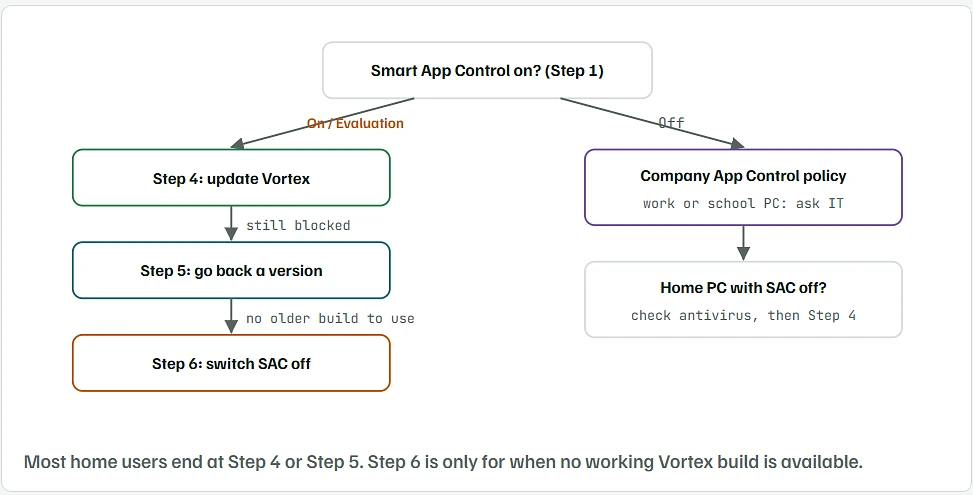
Microsoft has said there is no way to make an exception for a single app in Smart App Control. It is all on or all off.
- Open Windows Security → App & browser control → Smart App Control settings.
- Select Off and confirm.
- Open Vortex.
Read this before you switch it off:
- On Windows 11 without the April 2026 update (KB5083769), turning Smart App Control off is permanent unless you reset or reinstall Windows.
- With that update installed (builds 26100.8246 / 26200.8246 or newer), you can switch it back on from the same screen at any time.
- Check your build first: press Win + R, type
winver, press Enter. - With it off, keep Microsoft Defender running and only install software from sources you trust.
On a Work or School PC, Ask IT Instead
- Companies and schools use App Control for Business (formerly Windows Defender Application Control). It produces the exact same message.
- You cannot change that policy yourself, and you should not try to get around it.
- Send your IT team:
- the full error text
- the path to
winapi.node - the Step 3 Event Viewer output
- They can allow the file by hash or by path if they agree to it.
Things That Will Not Fix This Error
- Installing or updating Java. The error is about JavaScript, and Vortex does not use Java at all.
- Running Vortex as administrator. Smart App Control checks the file, not the account running it.
- Reinstalling the same 2.4.2 build. You get the same unsigned file with the same fingerprint, so it gets blocked again.
- Downloading
winapi.nodefrom another website. A file from an unknown source is a real security risk, and it will be unsigned too. - Deleting the
winapi-bindingsfolder. Vortex needs it and will not start without it.