



To connect a PHP page with a MySQL database and an Excel spreadsheet, you need a way to parse Excel files safely. The standard method is using the PhpSpreadsheet library. You will create an HTML form to upload the .xlsx file, use PHP to read the file into an array, and use a PDO database connection to loop through that array and insert the records into your MySQL table.
Quick Implementation Steps:

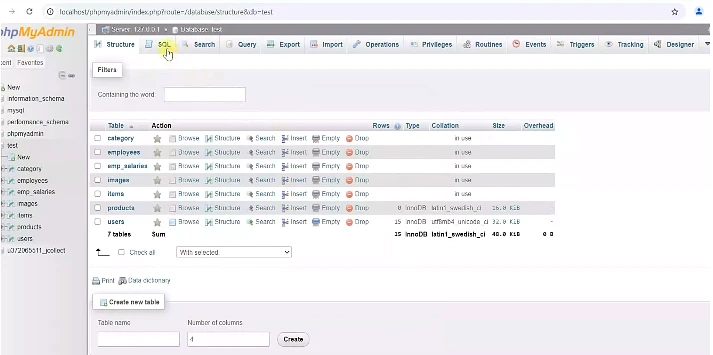
- Set Up the Database: Create a MySQL table with columns matching your Excel data.
- Install PhpSpreadsheet: Run
composer require phpoffice/phpspreadsheetin your project folder. - Create the HTML Form: Build a simple file upload form.
- Write the PHP Logic: Catch the uploaded file, parse it using
IOFactory::load(), and loop through the rows to runINSERTSQL queries.

Common Errors to Fix Immediately:
- Error: Form submits but no file is detected.
- Fix: Your HTML form is missing the encoding type. You must include
enctype="multipart/form-data"in the<form>tag.
- Fix: Your HTML form is missing the encoding type. You must include
- Error: “Class not found” when running PHP.
- Fix: You forgot to include Composer’s autoloader. Always put
require 'vendor/autoload.php';at the top of your PHP script.
- Fix: You forgot to include Composer’s autoloader. Always put
- Error: The Excel column headers (e.g., “Name”, “Email”) are being inserted into the database as a user.
- Fix: Skip the first row of your array loop (
if ($index > 0)) to ignore the header row.
- Fix: Skip the first row of your array loop (
The Code: All-In-One PHP Page (index.php)
Here is a complete, error-free script combining the HTML form and PHP processing logic.
PHP
<?php
// 1. Include Composer Autoloader to load PhpSpreadsheet
require 'vendor/autoload.php';
use PhpOffice\PhpSpreadsheet\IOFactory;

// 2. Database Connection (Update with your credentials)
$host = 'localhost';
$dbname = 'company_data';
$username = 'root';
$password = '';

try {
    $pdo = new PDO("mysql:host=$host;dbname=$dbname", $username, $password);
    // Set PDO error mode to exception for better debugging
    $pdo->setAttribute(PDO::ATTR_ERRMODE, PDO::ERRMODE_EXCEPTION);
} catch(PDOException $e) {
    die("Database Connection failed: " . $e->getMessage());
}

// 3. Process the Uploaded File
if (isset($_POST['submit'])) {

    // Check if a file was actually uploaded without errors
    if (isset($_FILES['excel_file']) && $_FILES['excel_file']['error'] == 0) {
        $file_tmp = $_FILES['excel_file']['tmp_name'];

        try {
            // Load the Excel file
            $spreadsheet = IOFactory::load($file_tmp);
            // Convert active sheet to an array
            $data = $spreadsheet->getActiveSheet()->toArray();

            // Loop through rows
            foreach ($data as $index => $row) {
                // FIX: Skip the first row (index 0) if it contains column headers
                if ($index > 0) {
                    $name = $row[0];  // Column A in Excel
                    $email = $row[1]; // Column B in Excel

                    // Only insert if row isn't completely empty
                    if (!empty($name) && !empty($email)) {
                        $stmt = $pdo->prepare("INSERT INTO users (name, email) VALUES (?, ?)");
                        $stmt->execute([$name, $email]);
                    }
                }
            }
            echo "<p style='color: green;'><strong>Success:</strong> Excel data imported to MySQL successfully!</p>";

        } catch (Exception $e) {
            echo "<p style='color: red;'><strong>Error parsing file:</strong> " . $e->getMessage() . "</p>";
        }
    } else {
        echo "<p style='color: red;'><strong>Error:</strong> Please upload a valid Excel file.</p>";
    }
}
?>

<!DOCTYPE html>
<html lang="en">
<head>
    <meta charset="UTF-8">
    <title>Import Excel to MySQL</title>
</head>
<body>

    <h2>Upload Excel File to Database</h2>

    <form action="" method="POST" enctype="multipart/form-data">
        <label for="excel_file">Choose Excel File (.xlsx, .xls, .csv):</label><br><br>
        <input type="file" name="excel_file" id="excel_file" accept=".xlsx, .xls, .csv" required>
        <br><br>
        <button type="submit" name="submit">Import Data</button>
    </form>

</body>
</html>
Creating the PHP Upload Form (upload.php)
This PHP page allows users to upload an Excel file.
<!DOCTYPE html>
<html>
<head>
    <title>Upload Excel File</title>
</head>
<body>

<h2>Upload Excel Spreadsheet</h2>

<form method="post" action="import.php" enctype="multipart/form-data">
    <input type="file" name="excel_file" required>
    <br><br>
    <button type="submit" name="submit">Upload & Import</button>
</form>

</body>
</html>
This form sends the Excel file to import.php.
Install PhpSpreadsheet Library

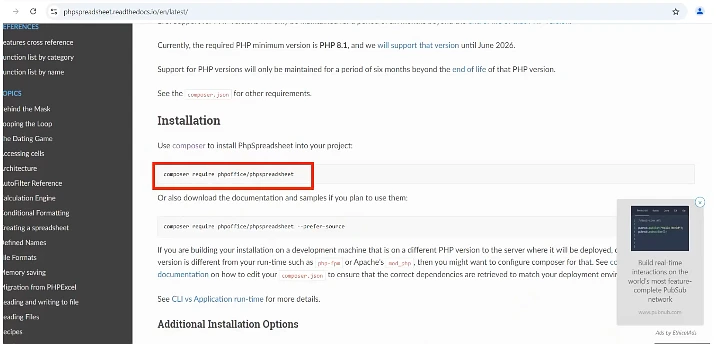
PHP cannot read Excel files alone. We use PhpSpreadsheet.
Install using Composer:
composer require phpoffice/phpspreadsheet
Then include it in your PHP file.
require 'vendor/autoload.php';
Connect PHP to MySQL (db.php)

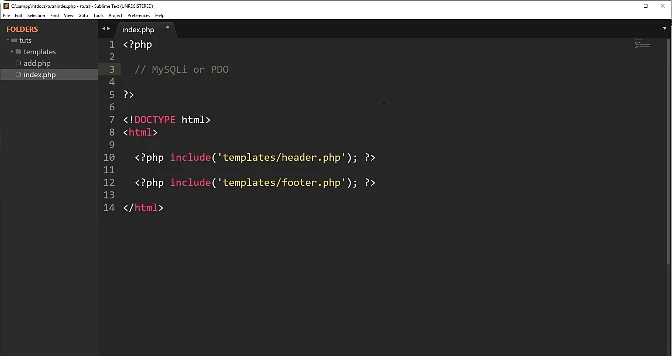
Create a reusable database connection file.
<?php
$conn = new mysqli("localhost", "root", "", "excel_import");

if ($conn->connect_error) {
    die("Database connection failed");
}
?>
This file will be included wherever needed.
Handling Excel Upload and Reading Data (import.php)
This is where the real work happens.
<?php
require 'vendor/autoload.php';
require 'db.php';

use PhpOffice\PhpSpreadsheet\IOFactory;

if(isset($_POST['submit'])){

    $fileName = $_FILES['excel_file']['tmp_name'];

    if($_FILES['excel_file']['size'] > 0){

        $spreadsheet = IOFactory::load($fileName);
        $sheet = $spreadsheet->getActiveSheet();
        $rows = $sheet->toArray();

        foreach($rows as $index => $row){

            if($index == 0){
                continue;
            }

            $name  = $conn->real_escape_string($row[0]);
            $email = $conn->real_escape_string($row[1]);
            $phone = $conn->real_escape_string($row[2]);

            $sql = "INSERT INTO users (name, email, phone)
                    VALUES ('$name', '$email', '$phone')";

            $conn->query($sql);
        }

        echo "Excel data imported successfully!";
    }
}
?>
Displaying Imported Data on a PHP Page (view.php)
Once data is stored, showing it is easy.
<?php
require 'db.php';

$result = $conn->query("SELECT * FROM users");
?>

<!DOCTYPE html>
<html>
<head>
    <title>Excel Data</title>
</head>
<body>

<h2>Imported Excel Records</h2>

<table border="1" cellpadding="10">
    <tr>
        <th>Name</th>
        <th>Email</th>
        <th>Phone</th>
    </tr>

    <?php while($row = $result->fetch_assoc()){ ?>
        <tr>
            <td><?php echo $row['name']; ?></td>
            <td><?php echo $row['email']; ?></td>
            <td><?php echo $row['phone']; ?></td>
        </tr>
    <?php } ?>

</table>

</body>
</html>
This confirms that Excel data is now fully connected to PHP and MySQL.
Handling Common Errors Using Code
Most errors come from wrong file types or empty files.
$allowed = ['xls', 'xlsx'];
$extension = pathinfo($_FILES['excel_file']['name'], PATHINFO_EXTENSION);

if(!in_array($extension, $allowed)){
    die("Invalid file type");
}
This small check saves hours of frustration.
Improve Security in Real Projects
Never trust uploaded files.
if($_FILES['excel_file']['size'] > 2000000){
    die("File too large");
}
Now you fully understand How Do You Create a PHP Page With MySQL Excel Spreadsheet using real, tested PHP code. Take it step by step, test often, and don’t rush. PHP rewards patience, not speed.