



If you are operating or maintaining a Merlo telehandler, encountering a blue screen with a vague “List of Errors” and a missing serial number (SN: /) can instantly halt your workday.
List of Errors:
UGSS_S - 131770 SW:5.6.0 SN: / List of errors
Anyone can help me about this.Thank you UGSS_S
OCR: UGSS_S-131770 UGSS S-131770 SW:5.6.0 .6.0 SN:/ List Listoferrors of errors HE ® P. Other posts. Allison Vasile ▻ Help me with my thesis please!
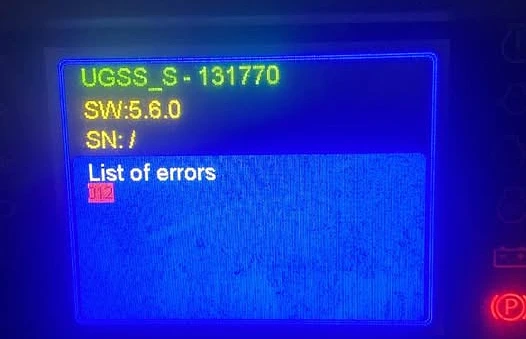
When the display reads UGSS_S alongside Error Code 011, the machine’s safety and stability systems lock up, preventing normal operation. In this guide, we will break down exactly what this error means, how to troubleshoot it on the shop floor, and how developers or diagnostics engineers simulate and debug this issue using CAN-bus code.
Understanding the UGSS_S Error Screen
The screen on your Merlo dashboard isn’t just telling you that something is broken; it is telling you that components aren’t talking to each other.
- UGSS_S: This refers to the core safety control module responsible for monitoring the machine’s dynamic stability, load limits, and attachment configurations.
- SW: 5.6.0: The firmware version currently flashed onto the display unit.
- SN: / (The Critical Clue): The forward slash indicates that the display cannot read the hardware serial number of the UGSS module.
- Error 011: A CAN-Bus Communication Timeout or a startup failure between the UGSS electronic control unit (ECU) and the display unit (HMI) cause this specific fault code to be activated.
Step-by-Step Hardware Troubleshooting
Before diving into complex diagnostics, follow this step-by-step physical inspection checklist:
Step 1: Perform a Hard Power Reset
If voltage drops, electronics may fail to start or get trapped in a boot loop.
- Switch off the ignition.
- Turn off the primary battery isolator switch, which is often located close to the battery box or engine compartment.
- Give the ECUs five to ten minutes to fully drain all of their capacitors.
Restart the machine by turning on the isolator.
Step 2: Test Battery and Alternator Voltage
Merlo control systems are highly sensitive to voltage drops. If your battery drops below 11.8V (on a 12V system) during crank, the UGSS module may fail to boot up fast enough, causing the display to miss its initialization window.
- Check battery health under load.
- Clean any corroded battery terminals.
Step 3: Inspect the CAN-Bus Wiring Harness
Because the serial number is missing, the physical network lines (CAN_H and CAN_L) are likely interrupted.
- Inspect the wiring harness plugs connecting to the back of the dashboard display.
- Check the main connector plug on the UGSS stability controller module.
- Look for pinched wires, corrosion, or backed-out pins in the connectors.
The Developer’s Angle: Simulating & Diagnosing CAN-Bus Timeouts
For field engineers, developers, or advanced technicians utilizing a may-to-USB connection (Kvaser, Peak-CAN, or an Arduino with a CAN shield), error 011 may be found via network traffic monitoring.
To get the serial number and status of the module, the display broadcasts a Request Parameter Group Number (PGN) when booting up. The display displays Error 011 if the UGSS module doesn’t transmit an acknowledgement frame and stays quiet.
Example: Python Script to Diagnose the Timeout
An example of Python using the python-can library may be seen below. In order to assist developers in determining if the UGSS module is entirely dead or only losing frames, this script mimics how a diagnostic tool listens for the module’s heartbeat or identification frames.
Python
import can
import time

# Configuration for the CAN interface (Adjust channel/bustype for your hardware)
CAN_CHANNEL = 'can0'
BIT_RATE = 250000 # Merlo networks typically run on J1939 standard 250k bps

# Expected CAN ID from the UGSS Module (Example J1939 Source Address)
UGSS_HEARTBEAT_ID = 0x18FEF100
TIMEOUT_LIMIT = 3.0 # Seconds to wait before declaring a communication failure

def monitor_ugss_bus():
    print(f"Initializing CAN interface on {CAN_CHANNEL} at {BIT_RATE} bps...")
    try:
        bus = can.interface.Bus(channel=CAN_CHANNEL, bustype='socketcan', bitrate=BIT_RATE)
    except Exception as e:
        print(f"Error: Failed to open CAN bus. {e}")
        return

    print("Listening for UGSS_S module response... Press Ctrl+C to stop.")
    start_time = time.time()

    while True:
        # Read messages from the bus with a short internal timeout
        msg = bus.recv(timeout=0.5)

        if msg is not None:
            # If we receive the expected ID from the UGSS module
            if msg.arbitration_id == UGSS_HEARTBEAT_ID:
                print(f"[OK] UGSS Node Detected! Data: {msg.data.hex().upper()}")
                # Reset timeout clock since module is actively communicating
                start_time = time.time()

        # Check if the time since the last valid message exceeds our limit
        elapsed_time = time.time() - start_time
        if elapsed_time > TIMEOUT_LIMIT:
            print(f"\n[CRITICAL ERROR] CAN-Bus Timeout: No response from UGSS module for {elapsed_time:.2f} seconds.")
            print("STATUS: Throwing Screen Error Code 011 (Missing SN / Comm Failure).")
            break

if __name__ == "__main__":
    monitor_ugss_bus()
How to Interpret the Code Results:
- If the script returns
[CRITICAL ERROR]immediately: The UGSS controller is completely unpowered (check fuses/relays) or the CAN wires are physically broken/shorted. - There is structural noise on the line if the script displays sporadic data. Examine the CAN network’s 120-ohm termination resistors. Data frames get corrupted in the middle of transmission if a resistor is destroyed.
Summary and Next Steps
Resolving a communication outage is the key to fixing a Merlo UGSS_S Error 011. The problem may be deeper inside a damaged software stack or a malfunctioning ECU hardware chip if hard power resets and wire checks are unable to bring the lost Serial Number back to the screen.
In order to re-flash the software module version 5.6.0 or replace it completely, you will then need to connect a proprietary Merlo diagnostic tool (like Merlo Savetime).
Safety Reminder: The UGSS system prevents the telehandler from tipping over. Never attempt to hotwire or bypass safety modules to operate a machine stuck in an error state.