



Somebody sent me their first ever C++ program a few days ago, asking why it wouldn’t run. I looked at it expecting a missing semicolon or a stray bracket, the usual first-week stuff.
#include <iostream>

int main() {
    std::cout << "i like pizza!" << std::endl;
    std::cout << "its really good!" << std::endl;
    return 0;
}
There was nothing wrong with it. Not one thing. And the error they were stuck on wasn’t even a compiler error, it was this:
collect2.exe: error: ld returned 1 exit statusChecking The Usual Suspects First
ld is the linker, the step that runs after your code has already compiled successfully and turns the result into an actual runnable program. So the first thing this error tells you is that the compiler already did its job fine, your syntax passed, and something is going wrong one stage later than most beginner errors happen.
The two most common causes for this, especially in VS Code, are duplicate main() functions sitting in the same project folder, or an extension trying to compile every .cpp file in a directory together instead of just the one you’re working on. Both are genuinely common, and both are worth checking before anything else.
Neither was the case here. One file, one main, nothing else in the folder competing for the job.
The Detail That Actually Mattered

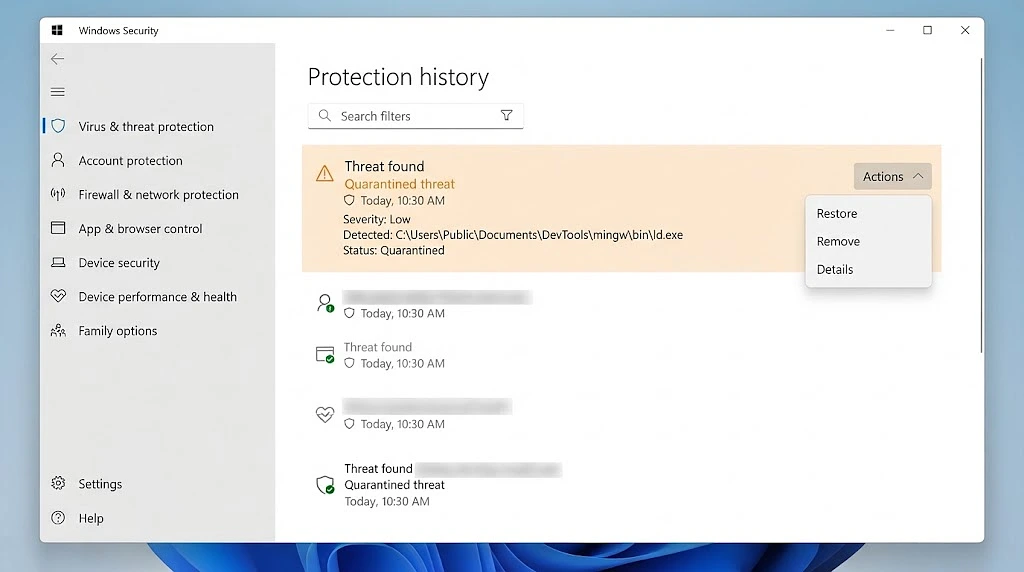
It came out almost by accident. They mentioned a Windows security popup they’d seen while installing the compiler and hadn’t thought much of, something about “Microsoft security blocked” a file, the exact wording already forgotten.
That one line changed the whole diagnosis.
Windows Defender occasionally flags parts of MinGW as suspicious, ld.exe specifically, because a linker’s entire job is writing executable binaries to disk, which is exactly the kind of low level behavior antivirus heuristics get twitchy about. This tends to happen right after a fresh install, before Defender has built up any trust in the new binary. When it triggers, the compile step can still succeed since compiling just produces an object file, but the link step either gets blocked outright or the resulting executable gets quarantined the moment it’s written. None of that shows up in the error message. You just get ld returned 1 exit status and nothing else.
There was a moment where switching from MinGW to the full Visual Studio IDE looked like the easier fix. Worth saying plainly, that wouldn’t have solved anything here. MinGW isn’t the problem, it’s a completely standard compiler, and swapping toolchains does nothing if Defender is the one interfering, since it could just as easily flag a different linker’s binary too.
What Actually Fixed It

Before reinstalling anything:
- Open Windows Security.
- Go to Virus & threat protection.
- Click Protection history.
- Look for a recent entry mentioning
ld.exe,g++,mingw, or a path likeMinGWormsys64. - Restore or allow it if you find one.
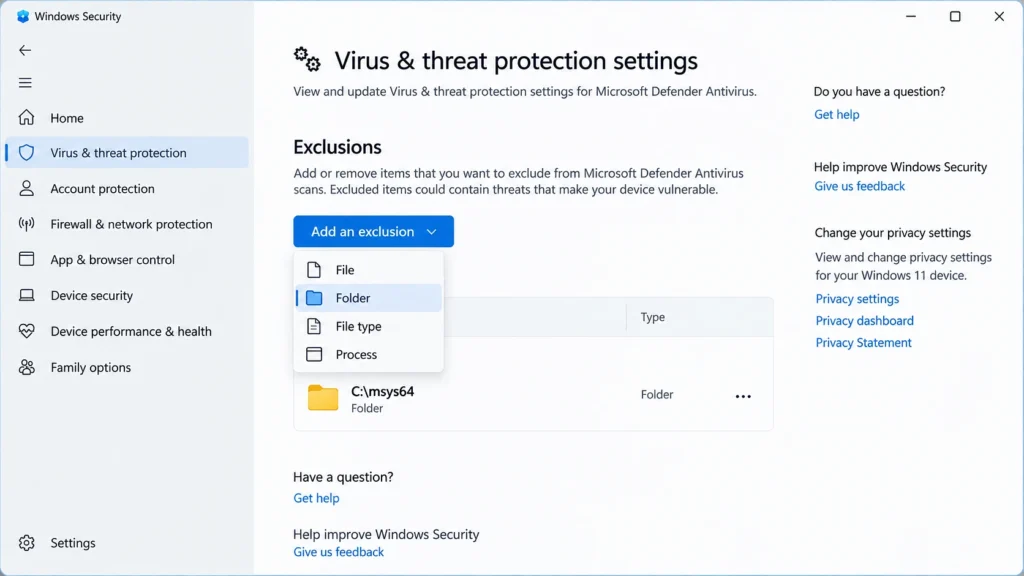
To stop it happening again, add an exclusion:
- Virus & threat protection settings → Manage settings.
- Scroll to Exclusions → Add or remove exclusions.
- Add the MinGW install folder.
Same code, same file, ran without a single change once the linker itself was unblocked.
The reason this one’s easy to miss is that the error gives you zero indication anything security related happened. It just reads like a generic linker failure, which sends most people checking their code first, then their project setup, then eventually toward a full reinstall, none of which was ever going to fix it. If your first C++ program looks fine and this error keeps showing up anyway, especially right after installing your compiler, check Defender’s protection history before doing anything else.