



Are you dealing with a persistent RuntimeException error after updating to Joomla 5.4.6?

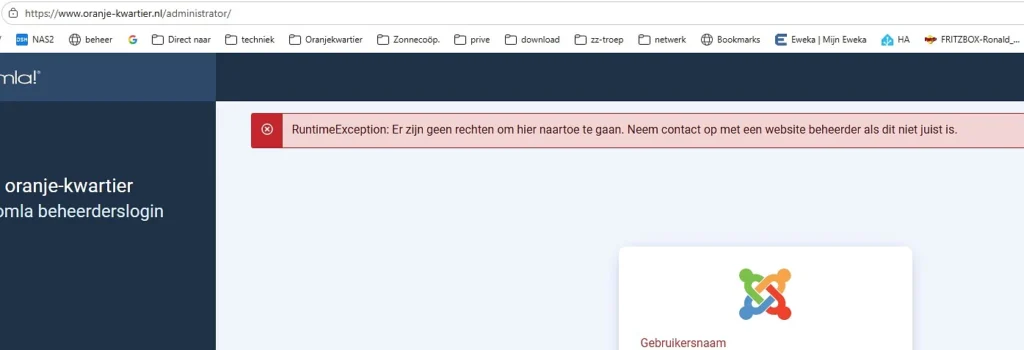
A common one is this: You change something on your site and then you receive a red error message on your logon page. It will not prevent you from doing anything at all, you can logon and perform your duties, but when you see it all the time, you are going to get very annoying. Unfortunately, even the basic “Clear the Cache” method doesn’t work.
If you're not a hardcore developer as a daily user, don't fear there are some tips for you. This particular non-blocking permission error is typically nothing more than a browser session or bookmarking bug, and is rarely a serious website issue, it is usually only a "There are no permissions to go here" or "Er zijn geen rechten om hier naartoe te gaan" error message.
If it is not, then it’s time to check the engine. The only way to fix all real-time RuntimeException errors in Joomla 5.4.6 is to go into Joomla’s debug mode and enable the maximum error reporting. The trace of the exception code will not be shown on the default “red screen” (or 500) error page, as RuntimeException is a generic exception that occurs when there is an error on the server. The default screen needs to be avoided to apply the appropriate fix.
Follow this systematic checklist to uncover and resolve the underlying issue:
Force Enable Error Tracking (If Backend is Inaccessible)
If you are unable to see the error, you will need to enable reporting manually through FTP or your Hosting Control Panel’s File Manager.
- Open your website’s root directory.
- Locate and open the configuration.php file.
- Find the following two variables and update their values exactly as shown below:
PHP
public $debug = true;
public $error_reporting = 'maximum';
- Save and re-upload the file.
- Refresh your broken page to see the complete PHP Call Stack Trace.
Identify and Disable Broken Third-Party Extensions
Joomla 5.4.6 relies heavily on modern exception handling. This means an outdated component, plugin, or module will instantly trigger a RuntimeException.
- Read the Trace: Look at the file path displayed in the error trace. It will usually contain
/components/com_...,/plugins/..., or/modules/.... - Disable via Database: If you cannot access the backend, log into your hosting account’s phpMyAdmin. Find your
_extensionstable, look for the offending extension name, and change its enabled status column from 1 to 0. - Disable via FTP Alternative: Temporarily append
_disabledto the specific extension’s folder name within your server directory to instantly restore site access.
Check PHP Version Requirements
Joomla 5.x has strict environmental constraints that must be met for the CMS to function correctly.
- Ensure your server is running on PHP 8.1, 8.2, or 8.3.
- Verify your host’s recent upgrades. If your hosting provider recently auto-upgraded your server environment to PHP 8.4, many legacy extensions will throw a RuntimeException.
- Toggle your PHP version back down to 8.2 or 8.3 via your hosting cPanel or PHP Selector if an upgrade caused the crash.
Clear Cached System Files
Sometimes cached update health checks or asset lists create data conflicts in version 5.4.6, leading to runtime errors.
- Navigate via FTP to your site’s
/cache/and/administrator/cache/directories. - Completely delete all folders and files inside them.
- Leave any
index.htmlfile intact. This deletion forces Joomla to rebuild clean runtime paths.
Address Common Known Triggers in 5.4.x
If the above steps haven’t resolved the issue, you may be facing a known conflict specific to the 5.4 branch.
- Automated Updates Health Check: Joomla 5.4 introduced background health checks. If you get a runtime error linked to automated updates, log into the backend and navigate to the Plugins manager. Search for System Joomla! Update Notification or Automated Updates, and disable it until a patch is applied.
- File & Directory Permissions: Ensure folders are set to permissions 755 and files to 644. Wrong file ownership limits throw write exceptions when Joomla tries to save configuration updates or process language paths.
Need further assistance? Then if you are still having this problem, comment below and copy/paste the exact text of your RuntimeException error or the first 3 lines of your error stack trace. This will help us determine the exact line of code where your website is crashing!