


If you are building a shared component library with Rollup and Storybook and consuming it inside a Next.js application, you may hit this cryptic bundler error:

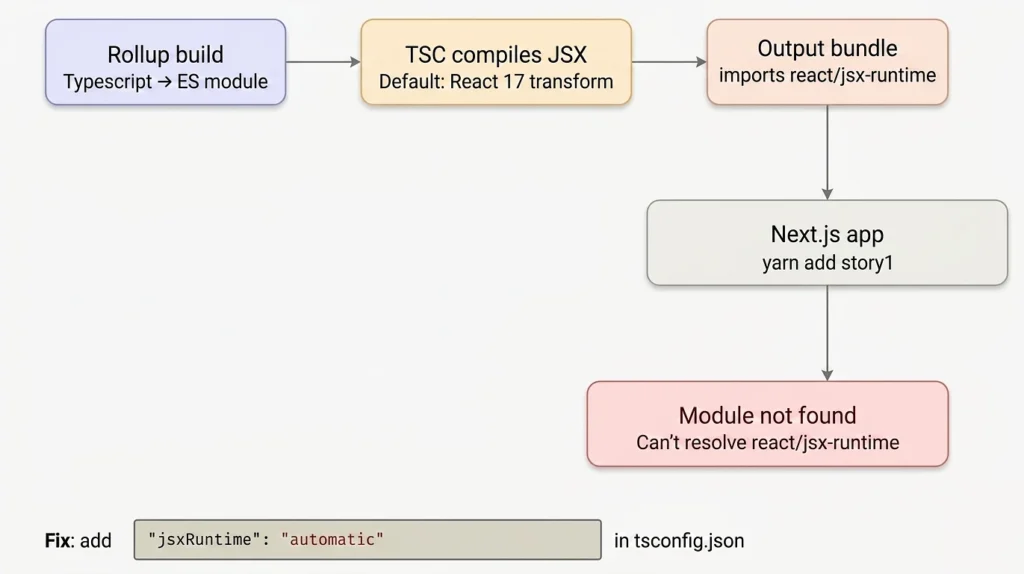
Module not found: Error: Can't resolve 'react/jsx-runtime'This error is not a problem with Next.js itself. It’s caused by how TypeScript’s JSX compiler transforms your JSX inside the Rollup build. Starting with React 17, TypeScript introduced a new automatic JSX transform (react-jsx) that replaces the classic React.createElement calls with imports from react/jsx-runtime. When that transform runs inside your Rollup build without the consuming app having react/jsx-runtime resolvable at that path, the bundler throws this error.
Understanding the Error
When TypeScript compiles .tsx files, it needs to know how to handle JSX syntax. There are two transform modes:
| Mode | Output | React import needed |
|---|---|---|
react (classic) | React.createElement(...) | import React from 'react' |
react-jsx (automatic) | _jsx(...) from react/jsx-runtime | Auto-injected |
If your tsconfig.json does not explicitly set "jsx": "react-jsx", TypeScript still uses the old classic mode but Rollup with rollup-plugin-typescript2 may silently apply the automatic transform, injecting import { jsx as _jsx } from 'react/jsx-runtime' into the compiled bundle output.
The consuming Next.js app then tries to resolve react/jsx-runtime from inside node_modules/story1/build/ a path that doesn’t exist and fails.
Fix Error in Next.js Application
Step 1 – Update tsconfig.json

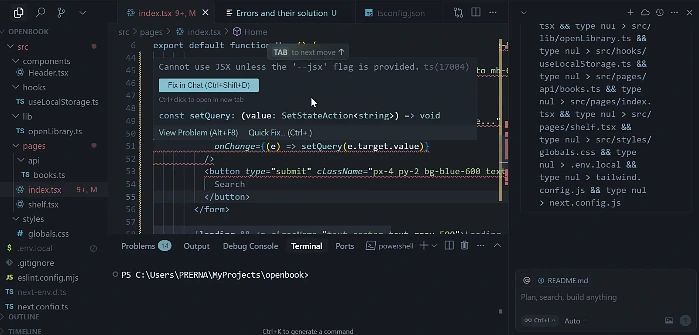
Create or update tsconfig.json in the root of your shared component library. Add "jsx": "react-jsx" under compilerOptions:
{
  "compilerOptions": {
    "target": "ES2018",
    "module": "ESNext",
    "lib": ["ES2018", "DOM"],
    "declaration": true,
    "declarationDir": "build",
    "outDir": "build",
    "strict": true,
    "moduleResolution": "node",
    "allowSyntheticDefaultImports": true,
    "esModuleInterop": true,
    "jsx": "react-jsx"
  },
  "include": ["src"],
  "exclude": ["node_modules", "build"]
}
The key change is "jsx": "react-jsx". This tells TypeScript to use React 17’s automatic JSX transform, which no longer requires import React from 'react' in every file and properly inlines the runtime.
Step 2 – Update rollup.config.js
Pass the TypeScript compiler options through to rollup-plugin-typescript2 to make sure it respects your tsconfig.json settings:
import commonjs from "@rollup/plugin-commonjs";
import resolve from "@rollup/plugin-node-resolve";
import peerDepsExternal from "rollup-plugin-peer-deps-external";
import typescript from "rollup-plugin-typescript2";
import packageJson from "./package.json";

export default {
  input: "./src/index.ts",
  output: [
    {
      file: packageJson.main,
      format: "cjs",
      sourcemap: true,
    },
    {
      file: packageJson.module,
      format: "esm",
      sourcemap: true,
    },
  ],
  plugins: [
    peerDepsExternal(),
    resolve(),
    commonjs(),
    typescript({
      tsconfig: "./tsconfig.json",
      tsconfigOverride: {
        compilerOptions: {
          jsx: "react-jsx",
        },
      },
    }),
  ],
};
The tsconfigOverride ensures the jsx setting is applied even if something else in the toolchain tries to override it.
Step 3 – Remove react from import statements in your components
With the automatic JSX transform, you no longer need to import React explicitly in every component file. Remove these lines if they exist:
// Before (classic transform can be removed)
import React from 'react';

// After (automatic transform no explicit import needed)
// React is automatically in scope for JSX
If you are using React APIs directly (like useState, useEffect, useRef), you still import just those named exports:
import { useState, useEffect } from 'react';
Step 4 – Clean the build output and rebuild
Remove any stale build artifacts before rebuilding:
rm -rf build

yarn build
# or
npm run build
Step 5 – Update the package version and republish
Bump your package version in package.json so the consuming app picks up the new build:
{
  "version": "0.1.1"
}
Then publish:
npm publish
# or if using a local link:
yarn link
Step 6 – Update the dependency in your Next.js app
In your consuming Next.js application, update and reinstall:
yarn add story1@latest
# or for a local link:
yarn link story1
Then restart the dev server:
yarn devMake sure react Versions are Compatible
Your shared library declares react: "^17.0.1" as a peerDependency. Make sure the consuming Next.js app has a compatible React version installed. Mismatched React versions across peerDependencies and node_modules can also cause confusing runtime errors. You can check with:

npm ls react
# or
yarn why react| File | Change |
|---|---|
tsconfig.json | Add "jsx": "react-jsx" under compilerOptions |
rollup.config.js | Pass tsconfigOverride: { compilerOptions: { jsx: "react-jsx" } } to the TypeScript plugin |
Component .tsx files | Remove import React from 'react' (no longer needed) |
After these changes, Rollup will compile your JSX correctly, and the consuming Next.js app will no longer encounter the Can't resolve 'react/jsx-runtime' error.