



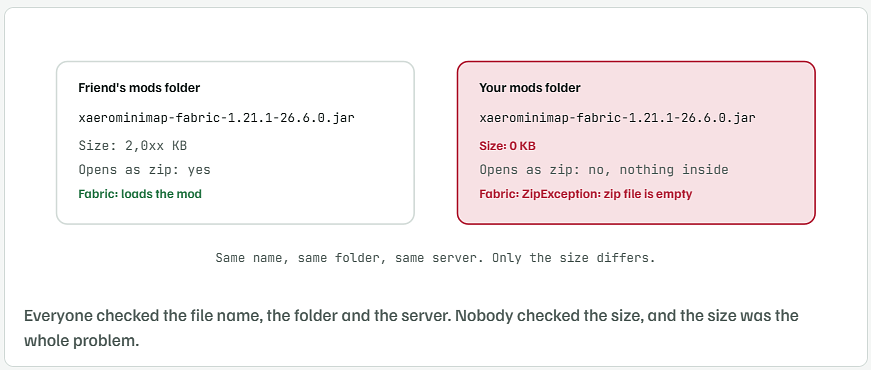
The last line of your crash tree says it plainly:java.util.zip.ZipException: zip file is empty, forxaerominimap-fabric-1.21.1-26.6.0.jar. A jar is a zip. Java opened yours, went looking for the zip's end-of-directory marker, and found a file with nothing in it. Your download finished at 0 bytes. Your friends got a full 2 MB file from the same link. You didn't, and the Modrinth download worked only because it was a fresh download, not because Modrinth's jar is different. The checker below finds any empty or broken jar in the folder in two seconds, so this never costs an evening again.

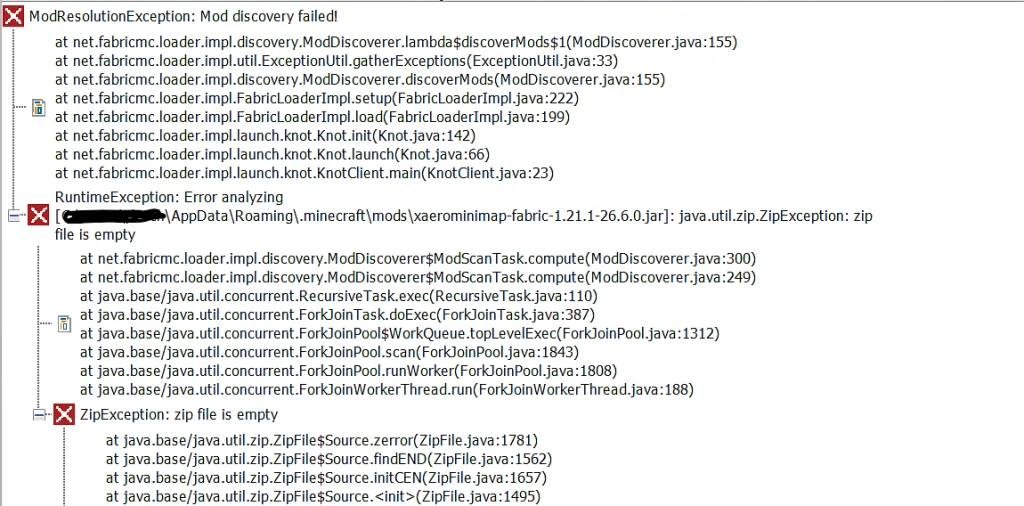
Read the Crash Tree From the Bottom Up
ModResolutionException: Mod discovery failed!is the summary. Fabric scans every jar inmodsbefore the game starts, and one scan threw an error, so the whole launch stops.RuntimeException: Error analyzing [...xaerominimap-fabric-1.21.1-26.6.0.jar]names the file. This line is the one to copy when asking for help.ZipException: zip file is emptywithfindENDandinitCENunder it: Java tried to read the zip’s central directory, which sits at the end of every zip, and the file had no end to read. That exact message appears for a 0-byte file and for nothing else.
A broken download that stopped partway gives a different message, invalid END header or zip END header not found. A download that saved the web page instead of the jar says error in opening zip file. All three get fixed the same way, by downloading again, and the checker tells them apart.
Check the File Size Before Anything Else
Open the folder and sort by size. The quickest way on Windows is PowerShell, which lists every jar under 100 KB:
Get-ChildItem "$env:APPDATA\.minecraft\mods\*.jar" |
  Where-Object Length -lt 100KB |
  Select-Object Name, Length
Name                                    Length
----                                    ------
xaerominimap-fabric-1.21.1-26.6.0.jar        0
A real Fabric mod is never that small. Fabric API alone is over 2 MB, and even a tiny tweak mod is 20 KB or more. Anything at 0 is the file from your crash.
Run This Checker on the Whole Mods Folder
Save this as check_mods.py anywhere, with Python 3 installed. It opens every jar the way Fabric does, reads the fabric.mod.json inside, and reports the ones that fail. The output below is from a test folder with one empty jar, one saved web page and one Forge build dropped in on purpose.
"""check_mods.py - find the mod jar Fabric cannot open.

Usage:  python check_mods.py            (uses the default .minecraft/mods folder)
        python check_mods.py "D:\\path\\to\\mods"
"""
import json
import os
import sys
import zipfile
from pathlib import Path

if len(sys.argv) > 1:
    mods = Path(sys.argv[1])
elif os.name == "nt":
    mods = Path(os.environ["APPDATA"]) / ".minecraft" / "mods"
else:
    mods = Path.home() / ".minecraft" / "mods"

if not mods.is_dir():
    sys.exit(f"No mods folder at {mods}")

bad = 0
for jar in sorted(mods.glob("*.jar")):
    size = jar.stat().st_size
    if size == 0:
        print(f"EMPTY     {jar.name}  (0 bytes - this is the one Fabric is crashing on)")
        bad += 1
        continue
    try:
        with zipfile.ZipFile(jar) as z:
            if z.testzip() is not None:
                print(f"CORRUPT   {jar.name}  ({size:,} bytes, a file inside is damaged)")
                bad += 1
                continue
            if "fabric.mod.json" not in z.namelist():
                print(f"NOT-FABRIC {jar.name}  ({size:,} bytes, no fabric.mod.json - a Forge or NeoForge build?)")
                bad += 1
                continue
            info = json.loads(z.read("fabric.mod.json"))
            print(f"ok        {jar.name}  ({size:,} bytes, {info.get('id')} {info.get('version')})")
    except zipfile.BadZipFile:
        head = jar.read_bytes()[:64]
        kind = "an HTML page, not a jar" if b"<" in head else "not a zip at all"
        print(f"BAD-ZIP   {jar.name}  ({size:,} bytes, {kind})")
        bad += 1

print(f"\n{bad} problem file(s). Delete each one and download it again.")
python check_mods.py
ok        fabric-api-0.116.0+1.21.1.jar  (2,117,340 bytes, fabric-api 0.116.0+1.21.1)
NOT-FABRIC journeymap-forge.jar  (135 bytes, no fabric.mod.json - a Forge or NeoForge build?)
BAD-ZIP   sodium-fabric-0.6.0.jar  (41 bytes, an HTML page, not a jar)
EMPTY     xaerominimap-fabric-1.21.1-26.6.0.jar  (0 bytes - this is the one Fabric is crashing on)

3 problem file(s). Delete each one and download it again.
- EMPTY is your case. Delete it and download again.
- BAD-ZIP, an HTML page means the browser saved the download page itself. CurseForge does this when the “direct” link expires or hits a login wall, and the saved page keeps the
.jarname. - NOT-FABRIC means a Forge or NeoForge jar got in. Fabric reports those with a different error, but the checker catches them while it’s there.
Why Your Copy Came Down Empty When the Same Link Worked for Everyone Else
CurseForge direct links go through a CDN that hands each person a short-lived signed URL. Four things end a download at 0 bytes on one machine and not another:
- Antivirus held the file. Windows Defender and most third-party scanners create the file first, scan the stream, and release it. A scan that stalls or quarantines leaves the 0-byte placeholder behind. Check the quarantine list for a
.jardated the same minute. - The browser’s download was interrupted and marked done. Chrome and Edge show a finished entry with no size when the connection dropped before the first byte. Hover the entry in
chrome://downloadsand the size reads 0 B. - You were the one who opened the link first. Signed CDN links are generated per click. The one you created and shared was fresh for your friends. Your own first click may have come from a tab that was still loading the page, and that half-request wrote the empty file.
- Disk full or write blocked. Rare, and the folder would have other empty files too.
Modrinth worked for you because it served a new file through a different CDN. Its jar for 26.6.0 is byte-for-byte the same as CurseForge’s. You can prove that with the hash below.
Compare the Hash With What Modrinth Publishes
Every file page on Modrinth shows a SHA-512 (and SHA-1) hash. If your download matches, the jar is complete, whatever site it came from.
Get-FileHash "$env:APPDATA\.minecraft\mods\xaerominimap-fabric-1.21.1-26.6.0.jar" -Algorithm SHA1
Algorithm       Hash                                      Path
---------       ----                                      ----
SHA1            7F3A...the 40-character hash...C91E       C:\Users\...
Open the mod’s version page on Modrinth, scroll to the file, and compare the first and last few characters. Different means a bad download. Same means the file is good and any remaining error is a different mod.
Get Everyone on the Same Jar Without Sharing Links
For an Aternos server with friends, stop sending download links around. Hashes drift, and one empty file costs a night. Two cleaner routes:
- Modrinth App or Prism Launcher with a shared modpack. Export the pack as an
.mrpack, send that one file, and each launcher downloads every jar itself and verifies the hash. A 0-byte file is impossible this way, because the launcher refuses a hash mismatch. - Zip the mods folder from the machine that works and send the zip. Crude, but the file sizes travel with it. Have everyone run the checker after they unzip.
And keep the checker next to the launcher. The next time Fabric says “Mod discovery failed”, run it first and skip the hour of comparing file names.