



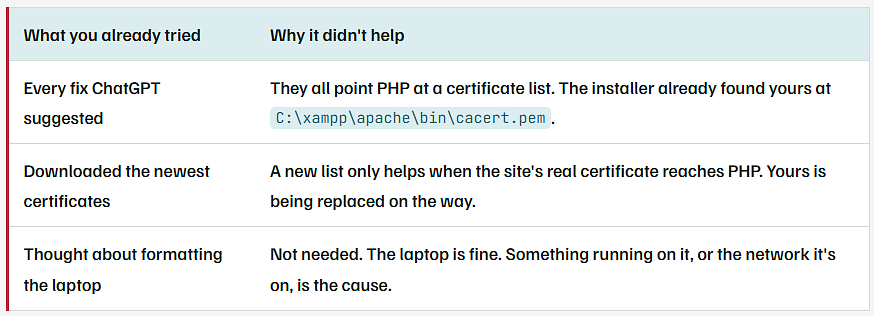
| What you already tried | Why it didn’t help |
|---|---|
| Every fix ChatGPT suggested | They all point PHP at a certificate list. The installer already found yours at C:\xampp\apache\bin\cacert.pem. |
| Downloaded the newest certificates | A new list only helps when the site’s real certificate reaches PHP. Yours is being replaced on the way. |
| Thought about formatting the laptop | Not needed. The laptop is fine. Something running on it, or the network it’s on, is the cause. |

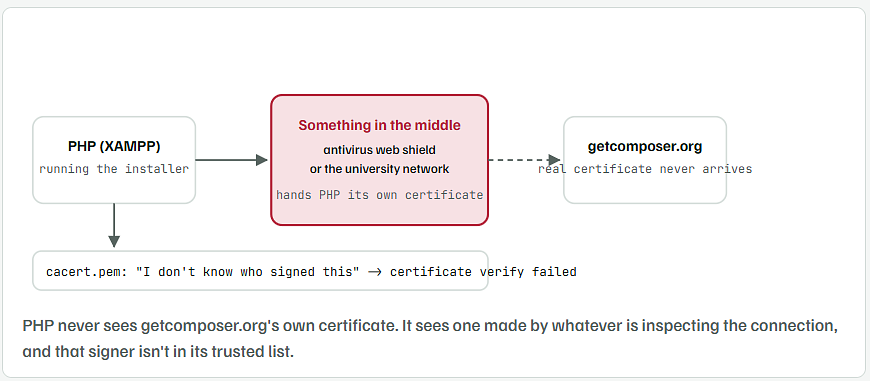
The error says "certificate verify failed," and the installer screen above it tells you why. It foundcacert.pem, readphp.ini, and still couldn't verify the connection. That happens when antivirus software or a school or office network sits between PHP and getcomposer.org and swaps in its own certificate. "This only happens to me" is the clue: the same laptop on a phone hotspot, or with the antivirus web shield paused, usually installs Composer in one go. Below, in order, are the two-minute check, the real fixes, and a manual install that works even if nothing else does.

What the Three Error Lines Are Saying
The "https://getcomposer.org/versions" file could not be downloaded: the very first thing the installer does is fetch a small text file. It never got that far.error:0A000086:SSL routines::certificate verify failed: OpenSSL, the part of PHP that handles HTTPS, got a certificate it can’t trace back to anyone incacert.pem.Failed to enable cryptoandFailed to open stream: the knock-on effects. No trusted connection, so no encryption, so no download.
The installer printing C:\xampp\apache\bin\cacert.pem and C:\xampp\php\php.ini is it showing you what it used. Both were found. The certificate file is not missing and not the fault.
Find Out Who Is Signing Your Connections
Open Command Prompt and run this one line. It asks getcomposer.org for its certificate and prints who issued it.
C:\xampp\php\php.exe -r "$c=stream_context_create(['ssl'=>['capture_peer_cert'=>true,'verify_peer'=>false,'verify_peer_name'=>false]]); $f=fopen('https://getcomposer.org/versions','r',false,$c); $p=stream_context_get_params($f); print_r(openssl_x509_parse($p['options']['ssl']['peer_certificate'])['issuer']);"
What a clean connection shows
Array
(
    [C] => US
    [O] => Let's Encrypt
    [CN] => R11
)
- Issuer says Let’s Encrypt, or another public name you’d expect from a website: the connection is clean. Skip to Step 3 and refresh
cacert.pem. - Issuer says Kaspersky, ESET, Avast, AVG, Bitdefender, Norton, McAfee, Fortinet, Zscaler, Sophos, or your university’s name: that’s your culprit. Go to Step 2.
- The
verify_peer=falsein that line is only there so the check can run at all. Don’t use it for the real install.
Fix the Interception: Pause the Shield or Trust Its Certificate
If It’s Your Antivirus
- Open the antivirus and find the setting called Web Protection, HTTPS scanning, Encrypted connections scanning or Web Shield. The name changes by product.
- Turn it off for 10 minutes.
- Run the Composer installer again.
- Turn the shield back on afterwards.
If you’d rather keep it on, add the antivirus’s root certificate to PHP’s list instead:
- Press Win + R, type
certmgr.msc, press Enter. - Open Trusted Root Certification Authorities → Certificates and find the one named after your antivirus.
- Right-click it → All Tasks → Export → choose Base-64 encoded X.509 (.CER) → save it as
C:\xampp\antivirus-root.cer. - Append it to the certificate file PHP uses:
type C:\xampp\antivirus-root.cer >> C:\xampp\apache\bin\cacert.pem
If It’s the University Network
- The quickest proof is to connect the laptop to your phone’s hotspot and run the installer. If it works there, the campus network is inspecting HTTPS.
- Install Composer over the hotspot. It’s a 3 MB download.
- To make it work on campus too, ask IT for their root certificate file (a
.ceror.crt) and append it with the sametype ... >>command above.
Point PHP at a Fresh cacert.pem
Do this once anyway. XAMPP’s bundled certificate list can be years old, and an expired root in it causes the same error on a clean network.
- Download the current list from
https://curl.se/ca/cacert.pemin your browser. - Save it as
C:\xampp\php\extras\ssl\cacert.pem. Make the folder if it isn’t there. - Open
C:\xampp\php\php.iniin Notepad and find these two lines. Remove the;at the start if there is one, and set the path:
INI · C:\xampp\php\php.ini
curl.cainfo = "C:\xampp\php\extras\ssl\cacert.pem"
openssl.cafile = "C:\xampp\php\extras\ssl\cacert.pem"
- Save the file. Close every Command Prompt window and open a new one, so PHP reads the change.
- Confirm PHP sees it:
C:\xampp\php\php.exe -r "print_r(openssl_get_cert_locations());"
The two lines that matter
[default_cert_file] => C:\xampp\php\extras\ssl\cacert.pem
[ini_cafile] => C:\xampp\php\extras\ssl\cacert.pem
- If you appended an antivirus certificate in Step 2, append it to this new file as well.
Test the Download Before Running the Installer Again
C:\xampp\php\php.exe -r "echo substr(file_get_contents('https://getcomposer.org/versions'), 0, 60);"
What you should see
{"stable":[{"path":"/download/2.9
- If text comes back, the connection is trusted and the installer will work. Run
Composer-Setup.exeagain. - If you still see
certificate verify failed, Step 1 will tell you which signer is still missing from the file.
Install Composer by Hand When You Need It Working Today
This skips the installer’s download entirely. The browser already trusts your antivirus or campus certificate, so it can fetch the file PHP can’t.
- In your browser, download
https://getcomposer.org/download/latest-stable/composer.phar. - Make a folder
C:\composerand movecomposer.pharinto it. - In the same folder, create a file called
composer.batwith this one line:
Batch · C:\composer\composer.bat
@C:\xampp\php\php.exe "C:\composer\composer.phar" %*
- Add
C:\composerto your PATH: press Win, type environment variables, open Edit the system environment variables → Environment Variables, pick Path under your user, click Edit → New, pasteC:\composer, OK everything. - Open a new Command Prompt and check:
composer --version
What you should see
Composer version 2.9.x 2026-xx-xx
- From here
composer requireandcomposer installwork the same as with the official installer. - Those commands download packages over HTTPS too. If they hit the same error, Steps 2 and 3 are still needed. The manual install only gets Composer itself onto the laptop.
The Fix You Will See Online That You Should Skip
composer config -g disable-tls true, or--disable-tlson the installer, turns off certificate checking. It makes the error go away by letting anyone on the network hand you a tampered package. Composer’s own documentation calls it a last resort for a reason.- Setting
verify_peer = falsein a script is the same thing one level down. - Formatting the laptop won’t change the antivirus you reinstall or the network you connect to. The error comes straight back.
Why It Looks Like It Only Happens to You
- Classmates on the same network who don’t get the error are probably running a different antivirus, or none, or installed Composer at home.
- Browsers don’t show the problem because Windows trusts the antivirus certificate system-wide. PHP keeps its own separate trust list in
cacert.pem, and nobody added the antivirus to that one. - That split is the whole story. Once PHP’s list includes the same signer Windows already trusts, the error is gone for good.