



You connect GitHub, give the Claude app every permission it asks for, and still get 403s and 404s. The reason is that Claude has four separate ways into GitHub, each one fails with its own message, and fixing one does nothing for the other three.
This guide started with a fiverr client message us from someone on Claude Free and GitHub Free. Claude could list their repos in “Add from GitHub” but often could not open the files. Public repos read fine, private ones did not, and any edit came back as 403 Resource not accessible by integration. They tried a personal access token, GitHub’s MCP server, a second GitHub connector, and finally a homemade Claude Skill that called the GitHub REST API directly. That last one ran and was stopped cold:

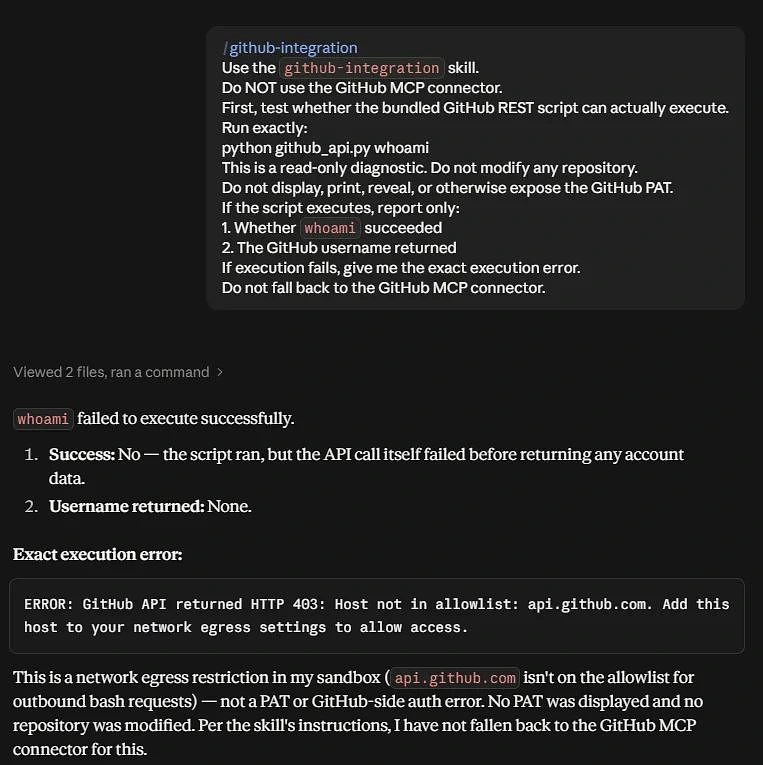
To top it off, a friend on the same Free plan pasted a token and everything worked. So is it the account, the permissions, or a bug? Mostly it is four different problems that all look like “GitHub is broken.” Once you can tell them apart, each one has a clear answer.
The Four Separate Ways Claude Reaches GitHub
Most guides treat “Claude plus GitHub” as one feature. It is really four, built by different teams for different jobs, and they do not share permissions:
- Door 1 “Add from GitHub” file sync. The paperclip menu in a chat or the GitHub button in a Project. Anthropic’s help page says it syncs file names and contents from one branch into the conversation. It only pulls files in. It can never write back, whatever permissions you give it.
- Door 2 The Claude GitHub App. This is what decides which repos Claude is allowed to touch. It has to be installed on your account, with repos selected. Being authorized is a different, weaker state, and that difference causes most of the 403s.
- Door 3 A custom connector (remote MCP). For example, GitHub’s own MCP server, added under Connectors. Its requests go out from Anthropic’s cloud using the credentials you give the connector.
- Door 4 Code in Claude’s sandbox. Scripts, Skills and
curlcommands that Claude runs while working with files. They sit behind a network allowlist that you do not control on a personal plan.

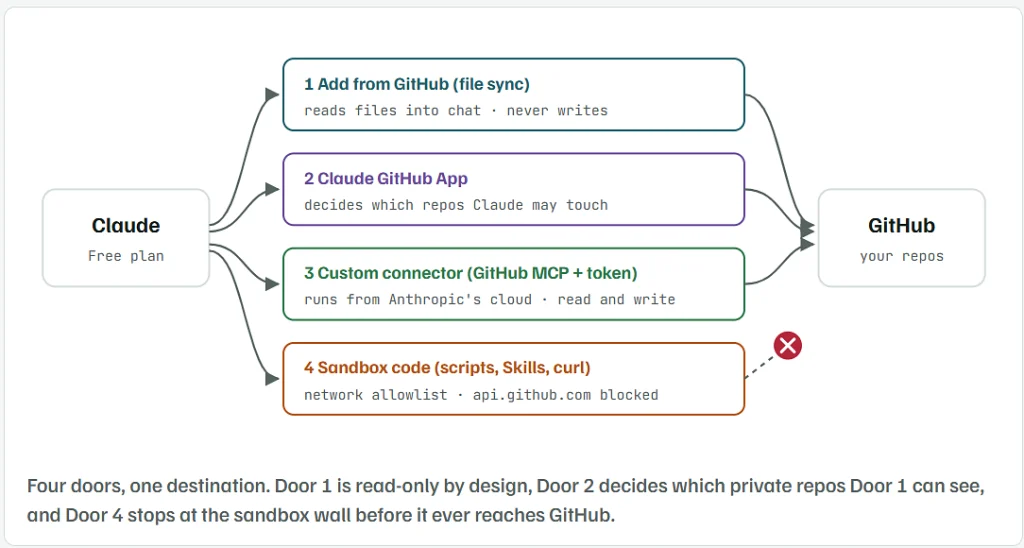
ClaudeFree planGitHubyour repos1 Add from GitHub (file sync)reads files into chat · never writes2 Claude GitHub Appdecides which repos Claude may touch3 Custom connector (GitHub MCP + token)runs from Anthropic’s cloud · read and write4 Sandbox code (scripts, Skills, curl)network allowlist · api.github.com blockedFour doors, one destination. Door 1 is read-only by design, Door 2 decides which private repos Door 1 can see, and Door 4 stops at the sandbox wall before it ever reaches GitHub.
Read the Error Message to Find Which Connection Failed
The exact wording of the error is the most useful clue you have. GitHub phrases its 403s differently depending on what kind of credential was refused, and Claude’s sandbox has a message all its own. Match yours here before you change any setting:
403 Resource not accessible by integration:
Repo shows in “Add from GitHub”, files return 404:
403 Resource not accessible by personal access token:
Host not in allow list: api.github.com:
“I only have a fetch or read tool”:
Door 2, the GitHub App The request used the Claude app’s token, and the app is not installed on that repo, or was only authorized. Go to Fix 1.
Door 1 and Door 2 Claude can see your account’s repo list but has no installed access to that private repo. Go to Fix 1, then Fix 2.
Door 3, your token The token works but lacks a permission, usually Contents: Read and write, or does not include that repo. Go to Fix 3.
Door 4, the sandbox Nothing is wrong with GitHub or your token. The script never left Claude’s sandbox. See the allowlist section.
No write door is connected Claude is telling the truth. A token pasted in chat gives it no new tool. Go to Fix 3.
Notice the difference between the first and third rows. “By integration” means a GitHub App token was refused, while “by personal access token” means your own token was. Someone who has tried every method at once can get both, and that is exactly how a setup ends up feeling “completely broken.”
Fix 1: Install the Claude GitHub App, Not Just Authorize It
GitHub keeps two separate lists, and Claude can appear on one without the other:
- Authorized GitHub Apps at
github.com/settings/apps/authorizations. Being here means GitHub knows who you are when you use Claude. It lets Claude list your repos. It does not give it access to files in private repos. - Installed GitHub Apps at
github.com/settings/installations. Being here, with repos selected, is what actually lets Claude read private files and, for tools that write, change them.
Several reports on Anthropic’s issue tracker in 2026 describe exactly this. Claude showed up under “Authorized” but never under “Installed,” reads worked, and every write failed with 403 Resource not accessible by integration. Disconnecting and reconnecting did not change it, because reconnecting only repeats the authorization step.
- Open
github.com/settings/installations. If Claude is not listed, the install never happened. - In Claude, open a chat, click +, choose Add from GitHub, and paste the URL of one of your private repos. When Claude cannot reach it, the picker offers a link to install the GitHub App. Use that link.
- On the GitHub screen that opens, pick your personal account, choose Only select repositories or All repositories, and press Install.
- If Claude was already installed, click Configure next to it on the same page, check that the repo you want is in the list, and save.
- Go back to Claude and add the repo again from Add from GitHub.
Repo belongs to an organization? Anthropic's help page notes that orgs using SSO hide their private repos until you grant access. Open github.com/settings/applications, click the Claude entry, and press Grant next to the org. If the button says Request, an org admin has to approve it, and reconnecting will not help.
Fix 2: Private Repos That List but Return 404
If the app is properly installed and one private repo still gives intermittent 404s, check its history. A 2026 report on Anthropic’s tracker describes private repos on a personal account that kept returning 404 after being transferred from an organization back to the personal account. Public repos on the same account worked, and reinstalling the app with “all repositories” did not fix it.
Two things are worth trying before you give up on that repo:
- In the app’s Configure page, remove the repo, save, then add it back and save again. This gives Claude a fresh grant for that repo instead of the one carried over from before the transfer.
- Switch off any extra GitHub connector you added while troubleshooting, so you know which one Claude is using while you test. In that report, removing the extra connector did not fix the 404 on its own, but it rules out a second set of credentials getting in the way.
If it still fails, it is a sync problem on Anthropic’s side, not your settings. Report it through the help widget on claude.ai with the repo name and the exact 404. Until it is fixed, Fix 3 reads private repos through your own token, so it gets around the problem.
Fix 3: Connect GitHub’s Own MCP Server With Your Token for Write Access
Door 1 can never write, and Door 4 is walled off. For a Free user who wants Claude to read private repos and create files, branches or pull requests, the dependable route is Door 3. That means adding GitHub’s remote MCP server as a custom connector, with your own token attached.
This is where most attempts go wrong in a small way that matters. Two facts from Anthropic’s custom connector help page:
- The Free plan allows one custom connector. If you added GitHub’s MCP server and then another GitHub connector, remove all but one first.
- A connector can send a fixed credential as a request header for servers that take tokens instead of an OAuth sign-in. That is where the token goes. Not in the chat.
Make a Fine-Grained Token With Only What Claude Needs
On GitHub, go to Settings → Developer settings → Personal access tokens → Fine-grained tokens → Generate new token. Use these settings:

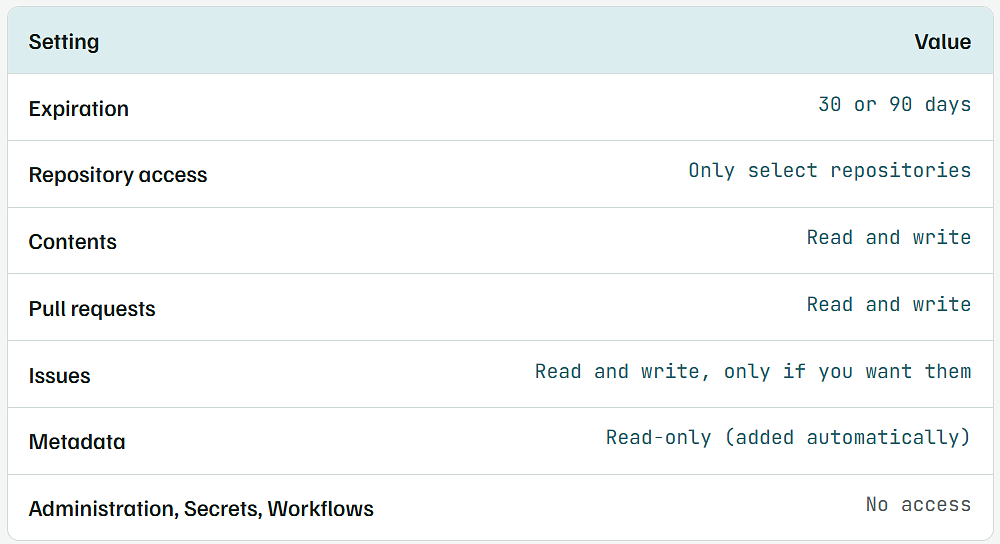
Copy the token once and keep it in your password manager. If a later write fails with “Resource not accessible by personal access token,” this permission list is where the gap is, almost always Contents left on Read-only, or the repo left out.
Add the Connector With the Token as a Request Header
- In Claude, open Customize → Connectors, click + Add, then Add custom connector.
- Give it a name such as
GitHub (my token). - For the server URL, enter GitHub’s remote MCP address:
https://api.githubcopilot.com/mcp/
- Choose to send credentials as request headers instead of signing in with OAuth, and add one header:
Request headerCopy
Authorization: Bearer github_pat_YOUR_TOKEN_HERE
- Save, then switch the connector on in a new chat from the tools menu.
GitHub’s documentation says its MCP server is open to users on any GitHub plan, with each tool needing the same access as the matching GitHub feature. Plain repo work like reading files, committing and opening pull requests needs nothing beyond GitHub Free.
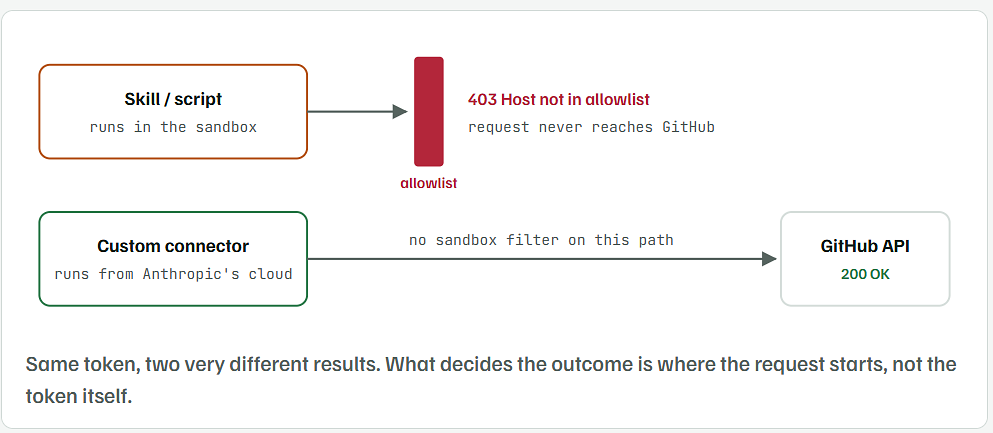
Why this works when the Skill did not: Anthropic's help page says custom connectors connect from Anthropic's cloud. The calls never pass through the sandbox where your script ran, so api.github.com being off the sandbox allowlist does not matter here.
Why “Host Not in Allowlist: api.github.com” Has No Fix Inside a Free Account
When Claude runs code (a Python script, a Skill, a curl), that code lives in a sandbox with its own network filter. Anthropic’s file creation help page lists the settings. Team and Enterprise owners can pick “package managers only,” add specific domains, or allow all domains. On Free, Pro and Max, the only control is a single on or off switch for network access, under Settings → Capabilities. There is no box for adding api.github.com.
So the homemade Skill was not badly written. It was knocking on a door that a personal account cannot unlock. Turning the switch off and on will not change the list either.Skill / scriptruns in the sandboxallowlist403 Host not in allowlistrequest never reaches GitHubCustom connectorruns from Anthropic’s cloudGitHub API200 OKno sandbox filter on this pathSame token, two very different results. What decides the outcome is where the request starts, not the token itself.

Why the Same Setup Works for Your Friend
“Same plan, same token idea, different result” sounds like an account bug, but there are more ordinary explanations to rule out first. The original post doesn’t give enough detail to know which one applies, but these are the usual differences:
- Their token went into a connector, yours went into the chat. A token typed into a message gives Claude no new tool, which is why Claude said it only had a fetch or read tool.
- Their Claude app reached “Installed.” If their first connection completed the installation and yours stopped at “Authorized,” the same buttons give different permissions.
- They have one GitHub connector, you have several. With the built-in connector, GitHub’s MCP server and a second connector all switched on, Claude may pick the one that lacks access for that repo.
- They are using a different Claude app. Claude Code, or a local MCP server set up in Claude Desktop, runs on your own computer and your own network, outside the web sandbox’s allowlist.
Ask your friend where they pasted the token and which apps appear under Installed GitHub Apps. Those two answers usually explain the difference.
A Two-Minute Test for Each Connection
Test one door at a time in a fresh chat, with only the connector you are testing switched on. Make the test repo a throwaway private one with a single README, so nothing important is at risk.
- Door 1 Use Add from GitHub to attach the README from your test repo. If its text shows in the chat, sync works.
- Door 2 Check
github.com/settings/installationslists Claude, with the test repo selected. - Door 3 With only your custom connector on, ask: “Using the GitHub connector, list the files in my test repo, then create notes.md on a new branch called claude-test.” If the branch appears on GitHub, write access works.
- Door 4 Nothing to test on a personal plan. Expect
Host not in allowlistand use Door 3 instead.
Once Door 3 passes, delete the claude-test branch and point Claude at your real repos. Keep the token limited to the repos you actually want it working in.