



Quick Take
If you only want the working approach, here it is in five steps:
- Save the Bee Movie script as a plain
.txtfile in your project folder. - Use
pyperclipto load the full text into your system clipboard. - Split the script into chunks of under 2000 characters each (Discord’s per-message cap).
- Use
pyautoguito paste each chunk and press Enter inside the focused chat window. - Add a 3-4 second delay between chunks to avoid hitting rate limits.
The Bee Movie script has lived on the internet as a copy-paste meme for over a decade. Roughly fifty thousand words. Around 270,000 characters. People drop it into Discord servers, comment threads, group chats anywhere they want to chaos-flood a conversation. Doing that manually is impossible. You cannot paste 270,000 characters into a chat box and expect anything good to happen.
Getting The Script
The python script is a transcribed screenplay that’s been floating around for years on Reddit, GitHub gists, and various text-dump sites. I grabbed a plain text version, cleaned out the line break inconsistencies, and saved it as bee_movie.txt in my project folder.
A note before going further: this is a fan transcript, not an official Dreamworks release. If you plan to publish or redistribute it, that’s a separate question. For a personal automation experiment, I didn’t worry about it.
with open("bee_movie.txt", "r", encoding="utf-8") as f:
    script = f.read()

print(len(script))  # 271,694 characters in my version
First Approach Clipboard
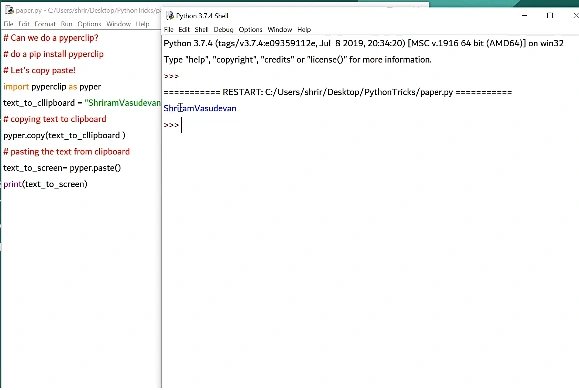
The simplest version of this whole project is loading the script into the system clipboard. From there you can paste it wherever you want, manually.

import pyperclip

with open("bee_movie.txt", "r", encoding="utf-8") as f:
    pyperclip.copy(f.read())

print("Script copied. Paste wherever you regret.")
pyperclip handled the full 270k characters without complaint. But this only solves half the problem. The moment I pasted into Discord, the message just sat there blinking before Discord cheerfully told me my message was too long.
Discord Doesn’t Want This
Discord caps regular users at 2000 characters per message. WhatsApp Web has its own limits. Most browser-based chat apps either truncate, lag, or refuse outright. Clipboard pasting is dead for the actual goal. I needed to break the script into chunks and send them one at a time.
Chunking The Script
This part is straightforward. Split the text into pieces small enough to send, ideally at paragraph boundaries so it doesn’t read like a corrupted file.
def chunk_script(text, max_len=1900):
    chunks = []
    current = ""
    for paragraph in text.split("\n"):
        if len(current) + len(paragraph) + 1 < max_len:
            current += paragraph + "\n"
        else:
            chunks.append(current)
            current = paragraph + "\n"
    if current:
        chunks.append(current)
    return chunks

chunks = chunk_script(script)
print(f"Split into {len(chunks)} chunks")
In my run this gave me around 140 chunks. Fine, mathematically. Not fine if you actually want to send all of them sequentially through a chat app.
Sending The Chunks

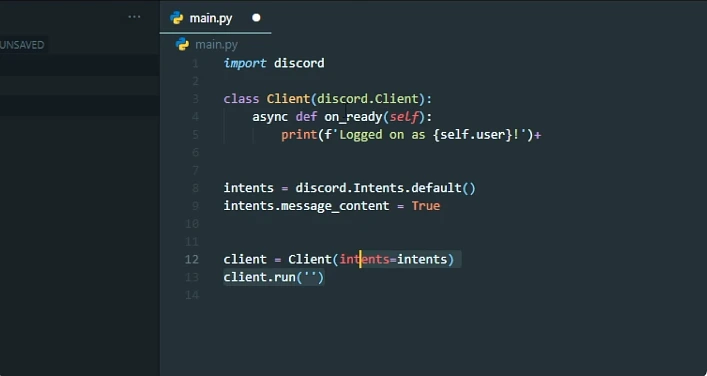
Two paths here. One is pyautogui, which simulates a real keyboard and mouse. The other is hitting the Discord API directly, which is cleaner but technically a terms-of-service grey zone if you’re using a self-bot.
I tried pyautogui first because it doesn’t need authentication. You focus the chat window manually, the script does the rest.
import pyautogui
import time

time.sleep(5)  # gives you time to focus the chat window

for chunk in chunks:
    pyautogui.typewrite(chunk, interval=0.001)
    pyautogui.press("enter")
    time.sleep(1.5)
This works in theory. In practice, three things broke it.
typewrite is extremely slow for large text because it’s simulating key presses one at a time. Watching it type out 1900 characters at a time is hypnotic in a bad way. Switching to clipboard-paste-per-chunk is much faster copy each chunk to the clipboard, then Ctrl+V and Enter.
for chunk in chunks:
    pyperclip.copy(chunk)
    pyautogui.hotkey("ctrl", "v")
    pyautogui.press("enter")
    time.sleep(2)
Rate Limits
Discord rate-limits message sending. Fire messages too quickly from the same account and you get a slowdown, then a temporary block. My initial 1.5-second delay was too aggressive. Bumping it to 3-4 seconds per message made it stable, which means sending the full script takes around eight minutes of staring at the screen while a bee-themed wall of text unfolds in a channel.
The third problem is that this is, by Discord’s rules, spam. If you do this in a server you don’t own, you’ll be kicked. If you do it in a server you do own, nobody else is there to read it.